How do I find my best or worst performing Pinterest Boards?
If you run a Pinterest account in the education and kids niche and rely on bulk posting to deliver real value—whether it’s printable worksheets, STEM activity ideas, or preschool learning resources—you already know one truth: not all boards perform equally. Some boards quietly drive steady traffic to your blog or course landing pages, while others sit dormant and drag down your overall impressions after the first 30–60 days. Identifying your highest-performing boards (and quietly retiring the weakest ones) is the single most effective way to focus your bulk-pinning efforts, maintain consistent growth, and stop the common “impressions drop after one month” cycle.
This long-form guide walks you through the exact native Pinterest Analytics process, the most important metrics for traffic-focused niches like education, how to use Tailwind Board Insights if you schedule in bulk, and proven strategies to build boards that actually convert. Every step is actionable, every metric explained with real-world context for kids/education creators, and every recommendation designed to help you scale without wasting time on underperforming boards.
Why Board Performance Matters More Than Pin Volume in Education Niches
Pinterest rewards relevance and engagement. In the kids/education space, users search with high intent—“easy preschool math activities,” “sensory bin ideas for toddlers,” “free printable alphabet worksheets.” Broad boards like “Kids Stuff” or “Fun Activities” rarely surface in these long-tail searches. Specific, keyword-rich boards do.
Bulk posting amplifies this truth. When you schedule 20–50 pins daily across dozens of boards, low-performing boards dilute your reach. High-performing boards, however, create compounding saves and outbound clicks that feed Pinterest’s algorithm fresh signals. The result: sustained impressions instead of the typical 30-day peak-and-drop pattern many education creators experience.
The goal is simple: double down on boards that generate saves + outbound clicks (the two metrics that signal both engagement and website traffic) and minimize effort on the rest.
Step-by-Step: Finding Top Boards in Native Pinterest Analytics
- Access the Dashboard
Log into your Pinterest Business Account on desktop (mobile view is limited). Click the hamburger menu (top left) → Analytics → Overview. - Locate Top Boards Section
Scroll to “Top Boards.” By default it shows the last 30 days sorted by impressions. Change the sort using the dropdown:- Outbound Clicks (best for traffic to your site)
- Saves (best for long-term algorithmic love)
- Engagements or Pin Clicks (secondary signals)
- Evaluate Performance
Look for boards with:- High outbound clicks relative to impressions (strong traffic driver)
- High saves (Pinterest pushes these pins to more feeds)
- Consistent presence in the top 10–15 boards over multiple 30-day windows
- Cross-Check with Filters
Click “More filters” (top right). Apply these for education creators:- Content type: Organic
- Device: Mobile (most parents browse on phones)
- Source: Your Pins (to isolate your own content)
- Claimed accounts: Select your domain to see real referral traffic
Export the filtered data as CSV for deeper spreadsheet analysis if you manage multiple boards.
Complete Pinterest Analytics Metrics Table
Use this table as your reference when judging board health. For education niches, prioritize outbound clicks and saves over vanity metrics like impressions alone.
| Metric | Definition | Why It Matters for Kids/Education Creators | Target Signal for “Best” Board |
|---|---|---|---|
| Impressions | Times your Pins appeared on screen | Shows reach, but not quality | High + paired with clicks |
| Saves | Times users saved your Pin to their own boards | Strongest algorithmic signal; creates evergreen traffic | >5% save rate |
| Outbound Clicks | Clicks that send users to your website/course | Direct traffic and revenue driver | Highest priority |
| Engagements | Total saves + Pin clicks + outbound clicks + swipes | Overall interaction | Rising trend |
| Engagement Rate | Engagements ÷ Impressions | Efficiency benchmark | >2% is strong |
| Pin Clicks | Clicks that open Pin in close-up view | Interest in your visual content | Secondary |
| Save Rate | Saves ÷ Impressions | How “save-worthy” your content is | >3–4% excellent |
| Outbound Click Rate | Outbound clicks ÷ Impressions | Traffic conversion rate | >1% is good |
Video Pins (common for quick craft demos or activity tutorials) also show video views, 10-second plays, and played-to-95%. Use these only when comparing video-heavy boards.
Identifying Worst-Performing Boards (and What to Do With Them)
Sort the same Top Boards section by the metrics above, then reverse the order (ascending). Boards at the bottom with near-zero saves and outbound clicks are your worst performers.
Common red flags in education niches:
- Generic titles (“Cute Kids Crafts” instead of “Toddler Fine Motor Activities with Pipe Cleaners”)
- Low Pin count (under 50–100 targeted Pins)
- No recent saves in the last 30 days
- Zero outbound clicks despite decent impressions
Action plan:
- Secret the board (hides it from your profile but keeps existing followers and Pins intact).
- Archive low-value Pins if needed.
- Never delete. Deleting boards removes followers and resets algorithmic history.
This keeps your profile clean while preserving social proof.
Tailwind Board Insights for Bulk Posters (Optional but Powerful)
If you schedule in bulk, Tailwind’s Board Insights report (left sidebar → Insights → Board Insights) gives faster sorting:
- Switch between Total Saves, Impressions, Pin Clicks, Outbound Clicks, and Pin Count.
- Sort ascending/descending with the arrow.
- Recent Trending Boards (last 30 days or most recent 5,000 Pins) highlights momentum.
- Virality score and engagement score provide quick health checks.
For education creators posting 30+ Pins daily, this report saves hours compared to manual Pinterest sorting.
Flowchart: Process to Identify & Act on Top/Worst Boards
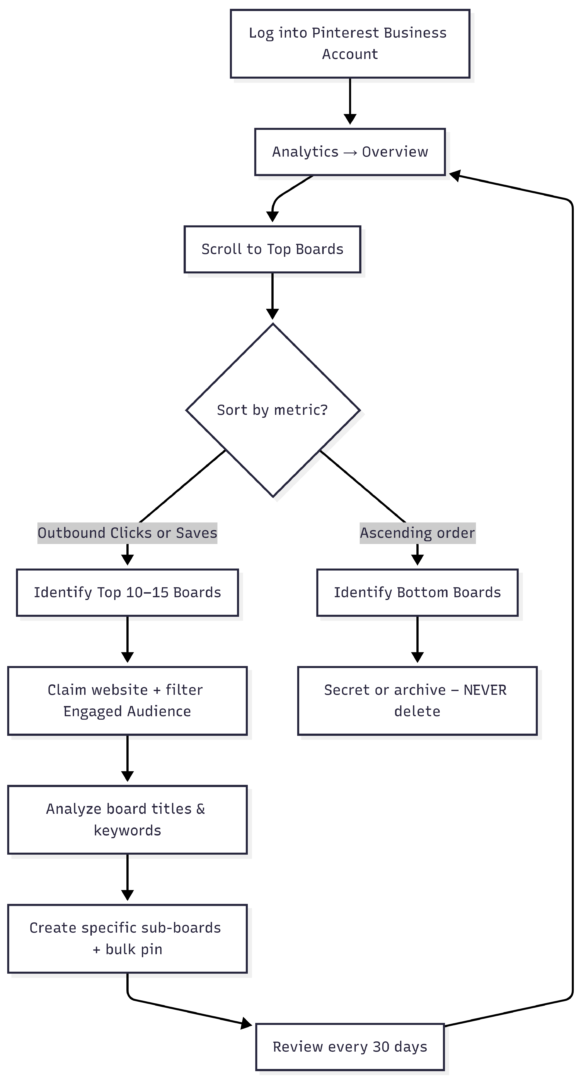
Copy-paste this Mermaid code block into any WordPress page or post with a Mermaid-compatible plugin for an interactive diagram.
Key Strategies to Build and Maintain High-Performing Boards
- Claim Your Website First
Verified domains show exact outbound clicks per board. Without this, you’re guessing. - Check “Your Engaged Audience”
In Analytics, switch the audience dropdown. Boards that already resonate with people saving your Pins will rank higher here—gold for education content. - Use Specific, Long-Tail Keywords
Replace cute titles with search-driven ones:- “Preschool Math Worksheets Free Printable”
- “Easy Sensory Play Ideas for 2 Year Olds”
- “Kindergarten Reading Activities at Home”
Descriptions should repeat the primary keyword naturally and include 2–3 secondary terms.
- House Your Best Pins in Targeted Boards
Your top-performing individual Pins usually live in your best boards. Move or duplicate high-engagement Pins (those with strong saves + clicks) into new specific boards. - Get Specific – Split Broad Boards
A general “Kids Activities” board underperforms. Split it:- “ Montessori Activities for Toddlers”
- “Holiday Crafts for Elementary Kids”
- “Free Printable Science Experiments”
- Each new board becomes a fresh opportunity for targeted bulk pinning.
- Review Regularly
Set a 30-day calendar reminder. Track whether top boards stay top or seasonal shifts (back-to-school, summer crafts) create new winners.
Extra Optimization Tips for Bulk Posters in Education/Kids Niche
- Value-First Bulk Posting: Every Pin must solve a real parent or teacher problem. Generic stock images fail. Use your own photos, clean graphics, and clear text overlays showing the exact benefit (“10-Minute Prep, Zero Mess”).
- Long-Term Mindset: Impressions often dip after 30 days because early saves exhaust the initial audience. Consistent daily pinning to your top 8–10 boards rebuilds momentum in months 3–6.
- Keyword-Targeted Boards Already in Use?
If you’re already doing this and impressions still drop:- Audit Pin quality (vertical 2:3 ratio, bright colors, text overlay with keyword).
- Increase Pin count per winning board to 150–300.
- Test 2–3 new sub-boards monthly.
- Ensure every Pin links directly to valuable content (blog post, freebie, or course) with strong calls-to-action.
Performance Over Time and Troubleshooting Declines
Pinterest Analytics shows “Performance over time” graphs. Look for steady upward trends in outbound clicks on your top boards. Dips often trace to:
- Over-pinning to weak boards
- Seasonal search changes
- Unclaimed website (no accurate traffic data)
- Video vs image format mismatch (test both)
Export data monthly and compare top boards side-by-side. Boards that consistently appear in the top 10 across 90+ days are your keepers.
Final Checklist for Education Creators
- [ ] Website claimed and verified
- [ ] Top 10 boards sorted by outbound clicks + saves
- [ ] Worst boards secreted or archived
- [ ] All board titles and descriptions use long-tail keywords
- [ ] 8–12 hyper-specific boards receiving 80% of bulk pins
- [ ] Monthly 30-day review scheduled
- [ ] Top Pins duplicated into new targeted boards
Follow this process and your Pinterest account will shift from scattered bulk posting to a focused, traffic-generating machine. High-performing boards compound: more saves → more impressions → more outbound clicks → more students and revenue for your education content.
You no longer need to wonder which boards are worth your time. The data is already inside your Analytics dashboard and Tailwind report. Use it, act on it, and watch your kids/education niche traffic grow month after month instead of fading after the first 30 days.
Please share this How do I find my best or worst performing Pinterest Boards? with your friends and do a comment below about your feedback.
We will meet you on next article.
Until you can read, Onsite Search Best Practices with Great Examples