How to Find Pinterest Group Boards (And Actually Get Accepted)
Pinterest group boards are one of the most underutilized tools for growing your Pinterest presence. If you’re trying to get your pins in front of a larger audience without paying for ads, group boards give you access to follower bases that aren’t yours — and that’s a significant advantage, especially when you’re starting out.
The problem is that most Pinterest guides skip the foundational step: how do you actually find group boards in the first place? This guide covers that in full — how to find them, how to identify the right ones, how to get accepted, and how to manage them if you own one.
What Is a Pinterest Group Board?
A Pinterest group board is a shared board where multiple contributors can save pins. Unlike a standard personal board (which only you control), group boards are collaborative — the board owner invites other Pinterest users to pin to the same board, and all of those pins are visible to all followers of that board.
This matters because when you pin to a group board, your content reaches every follower of that board, not just your own. A group board with 50,000 followers gives your pin exposure to 50,000 people regardless of how many followers you personally have.
You can spot a group board instantly: instead of a single profile photo in the board thumbnail corner, group boards show multiple overlapping circular profile pictures — one for each collaborator.
Why Group Boards Still Matter for Pinterest Growth
Group boards give you three things that are hard to build on your own:
Reach beyond your followers. Every pin you add to a group board is seen by the board’s entire follower base. If you’re new to Pinterest or have a small following, this is the fastest way to get content in front of a relevant audience.
Repins from active contributors. Other contributors and followers in niche-specific boards tend to be engaged. A well-placed pin in the right group board can generate repins from influential accounts.
Topical authority signals. Being consistently active in relevant group boards tells Pinterest’s algorithm that your content belongs in that niche, which can improve your distribution in home feed and search.
The key word throughout is relevant. Joining 100 unrelated group boards is worse than joining 10 tightly focused ones. Quality of fit matters more than quantity.
How to Find Pinterest Group Boards
There are several reliable methods, and using a combination of them will give you the best results.
Method 1: Pinterest Search Bar
This is the most direct approach and requires no third-party tools.
- Go to Pinterest and type your niche keyword followed by “group board” into the search bar. For example:
travel group board,food photography group board,personal finance group board. - Press Enter and then filter the results by clicking Boards at the top of the results page.
- Scan the results for boards with multiple profile pictures in the thumbnail — those are group boards.
- Click into each board to check its description for joining instructions, contributor count, and pin volume.
This method works well for broad niches. For more specific sub-niches, combine it with the methods below.
Method 2: Check Competitor and Influencer Profiles
Find 5–10 active, successful accounts in your niche. Go to their profile and scroll through their boards. Group boards they’re contributing to will show the multi-profile icon. This approach works especially well because:
- You’re finding boards that already accept contributors in your niche
- The accounts you’re studying have already been vetted for relevance and quality
- You can see firsthand how active the board is based on how recently they’ve pinned to it
On desktop, contributed group boards typically appear lower in a profile’s board list than personally owned boards. Look for the multi-person icon to identify them quickly.
Method 3: Use Pingroupie
Pingroupie is a dedicated external directory for Pinterest group boards. You can filter boards by category, sort by number of collaborators, repin rate, or follower count, and find contact information for board owners.
This is the most efficient method for bulk research. Instead of manually visiting profiles, you get a searchable database of group boards across every niche. Use it to build an initial target list, then visit each board on Pinterest to verify it’s active and relevant before reaching out.
Method 4: Tailwind Communities
If you use Tailwind (a Pinterest scheduling tool), its Group Board Finder feature can surface relevant group boards based on your niche and content. Tailwind also has its own “Communities” feature (formerly Tribes), which functions similarly to group boards and is worth exploring alongside traditional group boards.
Method 5: Follow the Board Owner’s Other Boards
Once you find one relevant group board, click on the board owner’s profile. Prolific group board owners typically manage or contribute to multiple boards in the same niche. One good find can quickly lead to a handful of relevant opportunities.
How to Identify a High-Quality Group Board
Not every group board is worth joining. Use this checklist to evaluate before requesting access:
| Signal | What to Look For |
|---|---|
| Follower count | Higher is better, but relevance matters more than raw numbers |
| Pin recency | Active boards have pins added within the last few days |
| Contributor count | 10–50 contributors is often a healthy range; thousands can mean low signal-to-noise |
| Board description | Should clearly define the topic and ideally include joining instructions |
| Repin rate | Check if pins on the board are getting repinned — this signals an engaged audience |
| Niche alignment | Must match your content closely, not just broadly |
Avoid boards that haven’t been pinned to in months, boards with thousands of contributors and no clear focus, or boards where the description gives no indication of how to join (often a sign the owner isn’t actively managing it).
How to Join a Pinterest Group Board
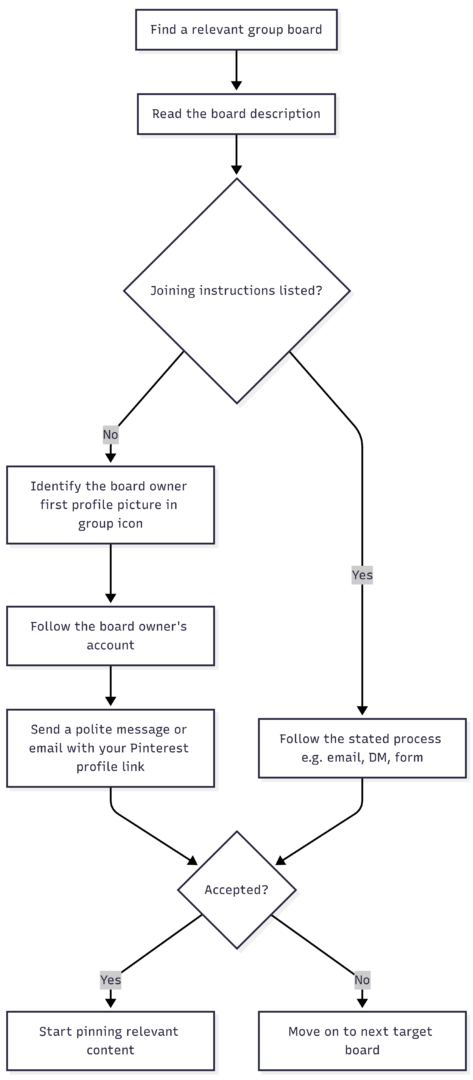
Step 1: Read the board description first. Most active group boards include joining instructions directly in the description. Common formats include an email address to contact, a link to a Google Form, or a direct message request.
Step 2: Identify the board owner. The board owner is always the first profile picture shown in the group board icon. Click their picture to visit their profile.
Step 3: Follow the owner. Many board owners require that you follow them before they can add you as a collaborator. Do this before reaching out.
Step 4: Send a clear, relevant request. Whether by Pinterest DM or email, keep your message short and specific. Include your Pinterest profile URL, the name of the board you want to join, and a brief note on why your content is a good fit for the board’s topic. Avoid generic copy-paste messages — board owners receive many requests and personalized outreach stands out.
Step 5: Check for a Join button. Some board owners enable a direct “Request to Join” button. If it’s available in the board description, use it — it’s the fastest path to access.
How to Manage a Pinterest Group Board (If You Own One)
If you create and manage your own group board, Pinterest gives you full control over what collaborators can do.
Inviting Collaborators
From your Pinterest profile, open the board you want to make collaborative. Click the plus icon below the board name, then search for users by name, username, or email. You can also copy an invite link to send directly.
Setting Collaborator Permissions
As the board owner, you can configure four permission levels:
| Permission | What It Allows |
|---|---|
| Do (almost) everything | Add, move, delete pins and sections; comment and react |
| Save and comment | Save and organize pins, comment and react |
| Invite other people | Allow collaborators to invite additional contributors |
| Board requests | Allow people to request to join the board |
Mix and match these based on how much control you want to retain. For curated niche boards, limiting collaborators to “Save and comment” keeps quality high.
Starring Favorite Pins
You can mark your favorite pins within a group board with a star, and then filter the board view to see only starred pins from you and your collaborators. This is useful for surfacing the highest-quality content in active boards with high pin volume.
Removing Collaborators
If a collaborator is pinning off-topic content or violating board guidelines, you can remove them. Go to the board, click the profile pictures shown at the top, find the collaborator, and click Remove. Confirm the removal. The collaborator won’t be notified automatically, but they will lose pinning access to the board.
Tips for Getting the Most Out of Group Boards
Be selective. Joining 10 tightly relevant boards outperforms joining 100 loosely related ones. Pinterest’s algorithm rewards relevance, and being active in niche-specific boards reinforces your topical focus.
Pin your best content. Group boards are high-visibility placements. Don’t use them to offload low-effort pins. Treat every pin to a group board as you would a pin on your best personal board.
Stay active and reciprocate. Engage with content other contributors post. Boards where collaborators support each other’s content see better overall performance.
Don’t spam. Pinning the same content repeatedly or flooding a board with dozens of pins at once will get you removed. Spread out your contributions and follow any frequency guidelines in the board description.
Monitor performance. Use Pinterest Analytics to see which group boards are driving impressions, saves, and outbound clicks. Cut boards that aren’t performing and focus energy on the ones that are.
Pre-Join Checklist
Before requesting access to any group board, verify:
- ✅ Board is active with recent pins
- ✅ Board niche closely matches your content
- ✅ You’ve followed the board owner
- ✅ Your own profile is complete with a clear bio and niche-relevant boards
- ✅ Your recent pins reflect the quality and topic of content the board shares
- ✅ You’ve read the full board description for specific joining requirements
Final Thoughts
Pinterest group boards are a genuine growth lever — but only when you approach them strategically. Finding them is straightforward once you know where to look: the Pinterest search bar filtered to Boards, competitor profiles, Pingroupie, and Tailwind’s board finder will collectively surface more opportunities than you can act on at once.
The real work is in choosing the right boards, crafting a credible join request, and then consistently contributing high-quality, relevant content. Do that, and group boards become one of the most cost-effective ways to expand your Pinterest reach without relying on paid promotion.
Please share this Find group boards on Pinterest quickly and easily with your friends and do a comment below about your feedback.
We will meet you on next article.
Until you can read, How to Update Your Permalink Structure