
How to fix the ISO 8601 warning
If you’ve landed on this page, you’ve probably stared at a cryptic warning in Google Search Console or your code editor that mentions “ISO 8601” and wondered what went wrong. This guide explains exactly what the ISO 8601 standard is, why violations trigger warnings, and how to fix them — whether you run a recipe blog using structured data markup or you’re a developer writing Kotlin or Java applications that handle dates and times.
What Is ISO 8601?
ISO stands for the International Organization for Standardization. ISO 8601 is their globally agreed-upon method for writing dates, times, and durations in a way that eliminates regional ambiguity. Without a standard, “06/07/08” could mean June 7, 2008 in the United States, July 6, 2008 in the United Kingdom, or something else entirely in another locale.
ISO 8601 resolves this by defining a single unambiguous format:
Date: YYYY-MM-DD → Example: 2024-09-15
Date and time: YYYY-MM-DDTHH:mm:ss±hh:mm → Example: 2024-09-15T14:30:00+05:30
The standard covers:
- Dates
- Times of day
- Coordinated Universal Time (UTC)
- Local time with UTC offset
- Combined date and time
- Time intervals
- Recurring time intervals
Any system that consumes structured data — including Google’s search infrastructure — expects these formats to be respected precisely.
ISO 8601 Warnings in Google Search Console (Recipe Sites)
Why Recipe Cards Trigger This Warning
If you run a food blog or recipe website, Google Search Console may show an ISO 8601 warning tied to your recipe structured data. The warning typically appears against fields like cookTime, prepTime, or totalTime. These fields use the ISO 8601 duration format, which is different from the date-time format.
The correct duration format is: PT[n]H[n]M
PT15M= 15 minutesPT1H30M= 1 hour and 30 minutesPT2H= 2 hours
Most recipe card plugins for WordPress (like WP Recipe Maker or Tasty Recipes) handle this automatically in the background when you type in plain English. But the plain English input you type still has to be parseable. If your input is ambiguous or uses unsupported formatting, the plugin cannot convert it correctly, and Google flags the result.
Valid vs. Invalid Time Inputs for Recipe Cards
The table below shows exactly which inputs your recipe card plugin can parse cleanly and which will produce an ISO 8601 warning:
| Input You Type | Valid? | Notes |
|---|---|---|
15 minutes | ✅ Yes | Standard, always safe |
1 hour, 5 minutes | ✅ Yes | Standard combined format |
65 minutes | ✅ Yes | Plugin converts to PT1H5M |
15 minutes (plus cooling time) | ✅ Yes | Parenthetical ignored safely |
15 minutes (up to 20 minutes) | ✅ Yes | Uses the leading number only |
15 minutes (at high pressure) | ✅ Yes | Descriptor in parentheses is fine |
15 minutes plus cooling time | ❌ No | “plus” outside parentheses breaks parsing |
1 hour, including cooling time | ❌ No | “including” breaks the number extraction |
20 minutes at high pressure | ❌ No | Descriptor outside parentheses fails |
15-20 minutes | ❌ No | Range format is not supported |
1h15m | ❌ No | Shorthand is not valid plain English |
30m | ❌ No | Single-letter abbreviation fails |
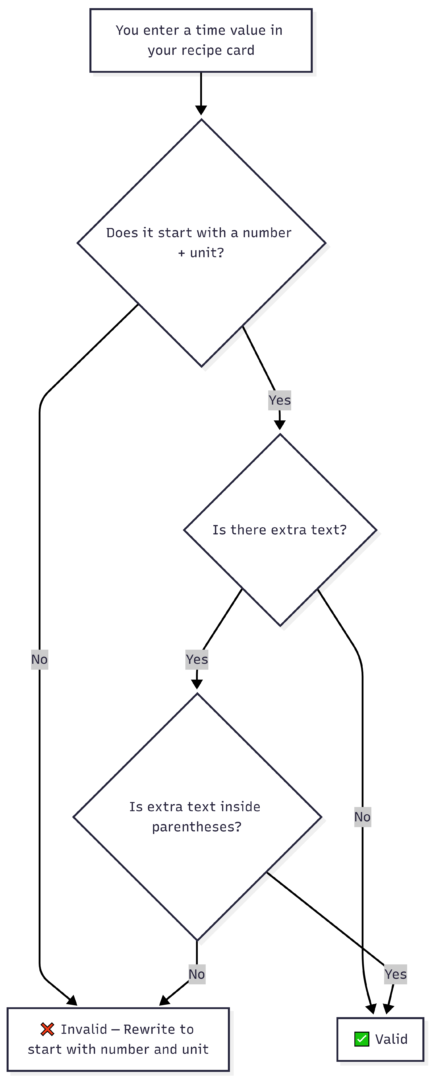
Rule of thumb: Always place any extra descriptors inside parentheses. The plugin reads only the number and unit that appear before the first parenthesis.
Decision Flow: Is Your Recipe Time Input Valid?
ISO 8601 Warnings in Code (Java, Kotlin, JavaScript, Swift)
For developers, ISO 8601 warnings appear when a date-time string is malformed, missing timezone information, or uses deprecated APIs that don’t comply with the standard. Here is how to diagnose and fix the most common scenarios.
The Standard ISO 8601 Date-Time Format
YYYY-MM-DDTHH:mm:ss±hh:mm
Breaking it down:
| Component | Meaning | Example |
|---|---|---|
YYYY | 4-digit year | 2024 |
MM | 2-digit month | 09 |
DD | 2-digit day | 15 |
T | Literal separator | T |
HH:mm:ss | 24-hour time | 14:30:00 |
±hh:mm | Timezone offset | +05:30 or Z for UTC |
Java and Kotlin: Choosing the Right Date-Time Class
The java.time API (introduced in Java 8) offers several classes. Choosing the wrong one is the most common cause of ISO 8601 noncompliance in backend code.
| Class | Use Case | Includes Timezone? | ISO 8601 Safe? |
|---|---|---|---|
ZonedDateTime | Scheduling with full timezone | ✅ Yes | ✅ Yes |
OffsetDateTime | API responses with UTC offset | ✅ Offset only | ✅ Yes |
LocalDateTime | DB storage (timezone handled separately) | ❌ No | ⚠️ Partial |
Instant | UTC timestamps, timezone-agnostic | ✅ UTC | ✅ Yes |
General rule: Use ZonedDateTime for anything user-facing. Use Instant for logging and storage. Avoid LocalDateTime in any context where timezone matters.
Formatting Dates Correctly in Kotlin
import java.time.ZonedDateTime
import java.time.format.DateTimeFormatter

fun main() {
    val now = ZonedDateTime.now()
    val formatted = now.format(DateTimeFormatter.ISO_OFFSET_DATE_TIME)
    println(formatted)
    // Output: 2024-09-15T14:30:00.000000000Z
}
Formatting Dates Correctly in Java
import java.time.ZonedDateTime;
import java.time.format.DateTimeFormatter;

public class ISO8601Formatter {
    public static void main(String[] args) {
        ZonedDateTime now = ZonedDateTime.now();
        String formatted = now.format(DateTimeFormatter.ISO_OFFSET_DATE_TIME);
        System.out.println(formatted);
        // Output: 2024-09-15T14:30:00.000000000Z
    }
}
Parsing an ISO 8601 String in Kotlin
import java.time.ZonedDateTime
import java.time.format.DateTimeFormatter

fun main() {
    val dateString = "2024-09-15T14:30:00+05:30"
    val parsed = ZonedDateTime.parse(dateString, DateTimeFormatter.ISO_OFFSET_DATE_TIME)
    println(parsed)
    // Output: 2024-09-15T14:30+05:30
}
Parsing an ISO 8601 String in Java
import java.time.ZonedDateTime;
import java.time.format.DateTimeFormatter;

public class ParseISO8601 {
    public static void main(String[] args) {
        String dateString = "2024-09-15T14:30:00+05:30";
        ZonedDateTime parsed = ZonedDateTime.parse(dateString, DateTimeFormatter.ISO_OFFSET_DATE_TIME);
        System.out.println(parsed);
        // Output: 2024-09-15T14:30+05:30
    }
}
The Most Common ISO 8601 Mistakes and How to Fix Them
1. Missing the T Separator
The T between date and time is mandatory in ISO 8601. A space is not a valid substitute.
| ❌ Wrong | ✅ Correct |
|---|---|
2024-09-15 14:30:00+05:30 | 2024-09-15T14:30:00+05:30 |
Fix in JavaScript:
const raw = "2024-09-15 14:30:00+05:30";
const fixed = raw.replace(" ", "T");
2. Missing or Malformed Timezone Offset
Timezone offsets must include a colon between hours and minutes. A Z suffix means UTC and is always valid.
| ❌ Wrong | ✅ Correct |
|---|---|
2024-09-15T14:30:00+0530 | 2024-09-15T14:30:00+05:30 |
2024-09-15T14:30:00 | 2024-09-15T14:30:00Z |
3. Date-Only Strings Where Full Timestamps Are Required
Some systems and APIs require a full timestamp. If you provide only a date, add the time component.
| ❌ Incomplete | ✅ Complete |
|---|---|
2024-09-15 | 2024-09-15T00:00:00Z |
4. Using SimpleDateFormat Instead of java.time
SimpleDateFormat is not thread-safe and does not correctly handle all ISO 8601 edge cases. It should not be used in modern Java or Kotlin code.
// ❌ Avoid
SimpleDateFormat sdf = new SimpleDateFormat("yyyy-MM-dd'T'HH:mm:ssXXX");

// ✅ Use this instead
DateTimeFormatter.ISO_OFFSET_DATE_TIME
5. Using ISO_LOCAL_DATE_TIME Instead of ISO_OFFSET_DATE_TIME
ISO_LOCAL_DATE_TIME omits the timezone offset entirely. This produces a string that looks valid but lacks the information needed for unambiguous interpretation.
// ❌ Wrong — no timezone in output
now.format(DateTimeFormatter.ISO_LOCAL_DATE_TIME)
// Output: 2024-09-15T14:30:00.000000000

// ✅ Correct — timezone included
now.format(DateTimeFormatter.ISO_OFFSET_DATE_TIME)
// Output: 2024-09-15T14:30:00.000000000Z
6. Duration Format in Specialized Systems (Azure, MySQL)
Some platforms like Azure and MySQL have their own quirks around durations. Azure Media Services, for example, may not accept PT5M in certain fields and instead expects 00:05:00. Always check platform-specific documentation for duration fields.
| System | Expected Duration Format | Example |
|---|---|---|
| Google Structured Data | ISO 8601 duration | PT1H30M |
| Azure (some services) | HH:MM:SS | 01:30:00 |
MySQL TIME field | HH:MM:SS | 01:30:00 |
| JavaScript (ms) | Integer milliseconds | 5400000 |
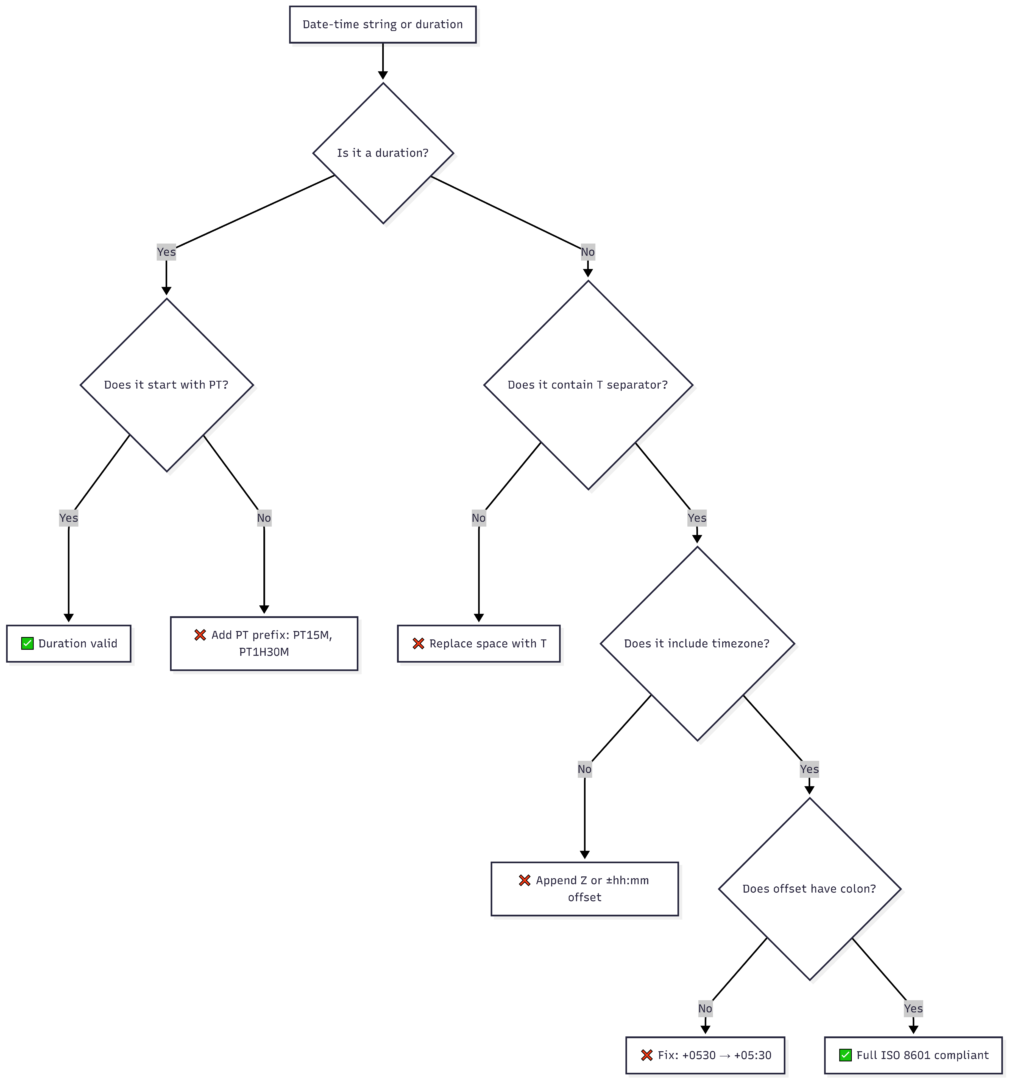
ISO 8601 Fix Checklist
Use this before publishing structured data or shipping date-related code:
Swift / iOS: ISO8601DateFormatter
On Apple platforms, the built-in ISO8601DateFormatter handles most cases, but its default configuration can fail silently with fractional seconds.
let formatter = ISO8601DateFormatter()
formatter.formatOptions = [.withInternetDateTime, .withFractionalSeconds]

let dateString = "2024-09-15T14:30:00.000Z"
if let date = formatter.date(from: dateString) {
    print(date)
}
Without .withFractionalSeconds, strings like 2024-09-15T14:30:00.000Z will return nil even though they are perfectly valid ISO 8601.
Summary: Everything in One Table
| Context | Common Problem | Fix |
|---|---|---|
| Recipe card (WordPress) | Range like 15-20 minutes | Use 15 minutes or 15 minutes (up to 20 minutes) |
| Recipe card (WordPress) | Descriptor outside parentheses | Wrap in parentheses: 15 minutes (at high pressure) |
| Google Search Console | Invalid cookTime duration | Plugin must output PT15M — fix the text input |
| Java / Kotlin | Missing timezone in output | Use ISO_OFFSET_DATE_TIME not ISO_LOCAL_DATE_TIME |
| Java / Kotlin | Legacy SimpleDateFormat | Replace with DateTimeFormatter from java.time |
| JavaScript | Space instead of T | raw.replace(" ", "T") |
| Any language | Offset missing colon | +0530 → +05:30 |
| Date-only string | Missing time component | Append T00:00:00Z |
| Swift / iOS | Fractional seconds parsing fails | Add .withFractionalSeconds to formatter options |
| Azure / MySQL | PT5M rejected | Use 00:05:00 format instead |
ISO 8601 warnings almost always come down to the same handful of mistakes: a missing T, a malformed timezone offset, an unsupported range or shorthand, or a legacy API that doesn’t produce compliant output. Fix the input format, use the right formatter class, and validate before you ship. Once your date-time strings are compliant, the warnings disappear and your structured data — whether for recipe rich results or an API consumer — will be parsed correctly every time.
Please share this How to fix the ISO 8601 warning with your friends and do a comment below about your feedback.
We will meet you on next article.
Until you can read, 10 Pinterest Optimization Tips for New & Small Accounts