
How to fix the Missing field: “description” warning
If you manage a WordPress site, WooCommerce store, or any content platform with structured data, you have likely encountered the Missing field: “description” warning inside Google Search Console. This warning signals that your structured data markup is incomplete — specifically, that a required description property is absent from your JSON-LD, Microdata, or schema output.
While this is technically a warning rather than a hard error, it directly impacts your ability to qualify for Rich Results in Google Search. Rich Results — those enhanced listings with star ratings, product details, recipe cards, and video thumbnails — depend on complete structured data. A missing description field won’t break your page, but it will reduce your eligibility for these high-visibility search features.
This guide walks through every scenario where this warning appears, how to fix it across different platforms, and how to verify the fix using Google’s own tools.
Why the “Missing field: description” Warning Appears
Google’s structured data documentation marks description as a recommended or required property for several schema types, including Product, VideoObject, Recipe, Article, and Event. When Google crawls your page and parses the structured data, if the description field is empty, null, or absent entirely, it logs the warning in Search Console.
The warning most commonly appears in three contexts:
- Product schema — especially on WooCommerce or Shopify stores with variations that have no individual description
- VideoObject schema — when a recipe plugin or video embed pulls metadata from YouTube or Vimeo but finds no description on the source platform
- General structured data — when SEO plugins generate schema markup based on post/page data that has an empty excerpt or description field
The key distinction: this is a warning, not a critical error. Your pages remain indexed. But Google explicitly states that fixing these warnings improves your chances of appearing as a Rich Result.
Where the Warning Appears and What It Affects
| Schema Type | Where Description Is Pulled From | Impact of Warning |
|---|---|---|
| Product | WooCommerce product or variation description | Reduces product Rich Result eligibility |
| VideoObject | YouTube/Vimeo video description field | Video snippet may not appear in search |
| Recipe | Recipe plugin metadata | Recipe card may be incomplete |
| Article | Post excerpt or meta description | Article schema is incomplete |
| Event | Event plugin fields | Event listing may be excluded from Rich Results |
How to Fix the Warning: By Platform
1. Fixing Missing Description for Video Schema (Recipe Plugins, Embeds)
If you use a recipe plugin like Tasty Recipes, WP Recipe Maker, or similar tools, they automatically pull video metadata from YouTube or Vimeo to generate VideoObject schema. If your video on those platforms has no description, the plugin has nothing to pull — and the warning appears.
Fix: Go to your YouTube Studio or Vimeo dashboard, open the video, and add a meaningful description. Once saved, your plugin will sync the description on the next crawl.
After updating the video description on the source platform:
- Log in to Google Search Console
- Navigate to Enhancements in the left sidebar
- Open the relevant report (e.g., Guided Recipes, Videos)
- Select the specific warning: Missing field “description”
- Click Validate Fix
Google will send an email confirming validation has started. If issues remain, you will receive a follow-up email with details.
2. Fixing Missing Description for WooCommerce Products
This is the most common scenario for WooCommerce stores. Product variations frequently have no individual description, even when the parent product does. Google’s structured data parser treats each variation as its own Offer entity — and if that variation lacks a description, the warning fires.
Basic fix: In your WordPress dashboard, go to each product, open the Variations tab, and add a description to each variation. This is the most reliable long-term solution.
For stores with many variations: Use a filter to programmatically add or pull descriptions into the schema output.
3. Fixing Missing Description in Rank Math (WooCommerce + Variations)
If you use Rank Math as your SEO plugin, the native settings panel does not include fields for all required schema properties. You will need to add a PHP filter to your theme’s functions.php file or via a code snippet plugin.
Here is the complete filter to add shippingDetails, hasMerchantReturnPolicy, and structured description support for both simple and variable products:
add_filter( 'rank_math/json_ld', function( $data, $jsonld ) {
    if ( empty( $data['richSnippet'] ) || ! in_array( $data['richSnippet']['@type'], [ 'Product', 'ProductGroup' ] ) ) {
        return $data;
    }

    $data['shippingDetails'] = [
        '@context'            => 'https://schema.org/',
        '@type'               => 'OfferShippingDetails',
        '@id'                 => '#shipping_policy',
        'deliveryTime'        => [
            '@type'       => 'ShippingDeliveryTime',
            'handlingTime' => [
                '@type'    => 'QuantitativeValue',
                'minValue' => 0,
                'maxValue' => 1,
                'unitCode' => 'DAY',
            ],
            'transitTime' => [
                '@type'    => 'QuantitativeValue',
                'minValue' => 1,
                'maxValue' => 3,
                'unitCode' => 'DAY',
            ],
        ],
        'shippingRate'        => [
            '@type'    => 'MonetaryAmount',
            'value'    => 5,
            'currency' => 'USD',
        ],
        'shippingDestination' => [
            '@type'          => 'DefinedRegion',
            'addressCountry' => 'US',
        ],
    ];

    $data['hasMerchantReturnPolicy'] = [
        '@context'             => 'https://schema.org/',
        '@type'                => 'MerchantReturnPolicy',
        '@id'                  => '#merchant_policy',
        'applicableCountry'    => 'US',
        'returnPolicyCategory' => 'https://schema.org/MerchantReturnFiniteReturnWindow',
        'merchantReturnDays'   => 30,
        'returnMethod'         => 'https://schema.org/ReturnByMail',
        'returnFees'           => 'https://schema.org/FreeReturn',
    ];

    if ( 'Product' === $data['richSnippet']['@type'] ) {
        $data['richSnippet']['offers']['shippingDetails']          = [ '@id' => '#shipping_policy' ];
        $data['richSnippet']['offers']['hasMerchantReturnPolicy']  = [ '@id' => '#merchant_policy' ];
        return $data;
    }

    if ( empty( $data['richSnippet']['hasVariant'] ) ) {
        return $data;
    }

    foreach ( $data['richSnippet']['hasVariant'] as $key => $value ) {
        if ( empty( $value['offers'] ) ) {
            continue;
        }
        $data['richSnippet']['hasVariant'][ $key ]['offers']['shippingDetails']         = [ '@id' => '#shipping_policy' ];
        $data['richSnippet']['hasVariant'][ $key ]['offers']['hasMerchantReturnPolicy'] = [ '@id' => '#merchant_policy' ];
    }

    return $data;
}, 99, 2 );
Important: Change 'value' => 5, 'currency' => 'USD', 'addressCountry' => 'US', and 'merchantReturnDays' => 30 to match your actual shipping and return policy.
For the description field specifically on variations, Rank Math currently relies on whatever text you enter in the variation description field in WooCommerce. There is no native dynamic fallback. Until Rank Math adds this feature, manually filling in variation descriptions remains the most reliable path.
4. Fixing Missing Description in Yoast SEO
Yoast generates schema based on your post’s excerpt and Yoast meta description field. If both are empty, the description property in the generated JSON-LD will also be empty.
Fix:
- Go to the post or product
- Scroll to the Yoast SEO meta box
- Fill in the Meta description field under the SEO tab
- For products, also fill in the WooCommerce Short Description field
Yoast maps these to the schema description property automatically.
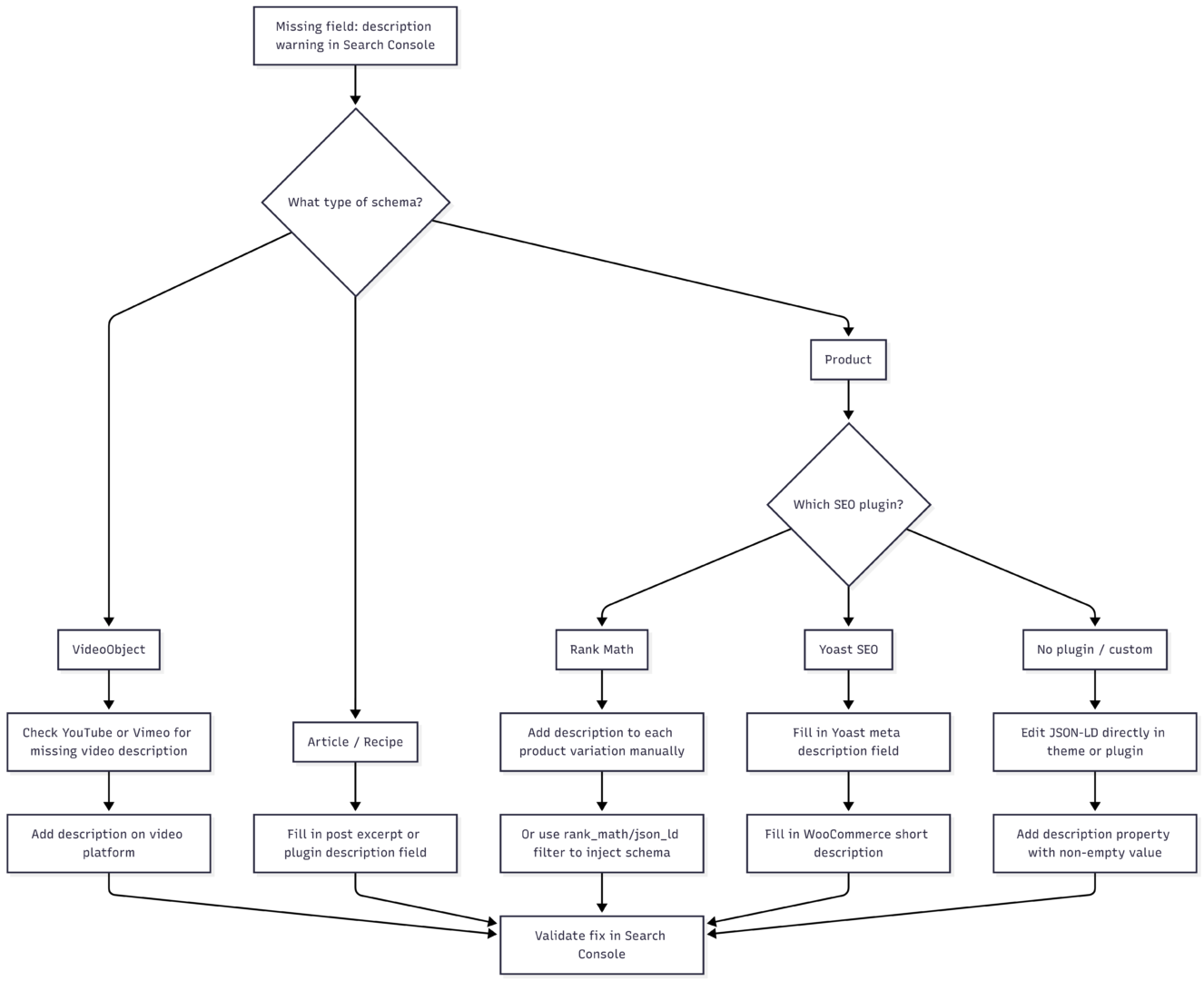
Decision Flow: Which Fix Applies to You?
How to Write an Effective Schema Description
The description you add is not just for Google’s validation — it also appears in rich search results and influences click-through rates. Follow these guidelines:
- Length: 50–300 characters is ideal. Long enough to be informative, short enough to display cleanly.
- Content: Describe what the product, video, or article actually is. Avoid keyword stuffing.
- Uniqueness: Each product variation should have a unique description if they differ meaningfully (color, size, material).
- No HTML: Schema descriptions should be plain text only. Strip any HTML tags before injecting into JSON-LD.
Validating the Fix
After making changes, always validate before requesting Google to re-crawl.
Step 1: Use the Rich Results Test
Go to search.google.com/test/rich-results, enter your page URL, and run the test. Confirm the description field is now populated in the parsed schema output.
Step 2: Validate in Search Console
- Open Google Search Console
- Go to Enhancements and open the relevant report
- Click the specific warning entry
- Click Validate Fix
Google will begin re-crawling the affected URLs. You will receive email confirmation. If validation fails, Google will send a follow-up with details on which URLs still have issues.
Step 3: Use URL Inspection
For individual URLs, use the URL Inspection tool in Search Console. Click Test Live URL to check the current state of the page’s structured data without waiting for a scheduled crawl.
Common Mistakes That Cause This Warning to Persist
| Mistake | Why It Causes the Warning |
|---|---|
| Adding description to parent product only | Variations still have no description in their individual Offer schema |
| Using HTML in the description field | Some parsers strip HTML, leaving an effectively empty description |
| Clearing cache after code changes | Cached pages may still serve old schema without the description |
| Updating Vimeo/YouTube description but not re-saving the post | Plugin may not re-pull metadata until the post is re-saved |
| Using placeholder text | Google may flag very short or generic descriptions as insufficient |
Summary: Fix Checklist
- Add a description to your video on YouTube or Vimeo if the warning is for
VideoObjectschema - Fill in the WooCommerce variation description for each product variant
- Use the Rank Math filter code to programmatically inject
shippingDetailsandhasMerchantReturnPolicyif those warnings also appear - Fill in Yoast’s meta description field for articles and standard products
- Validate using the Rich Results Test tool before submitting for re-validation in Search Console
- Clear your site cache after making any code or content changes
- Request validation inside Search Console once the fix is confirmed live
The Missing field: “description” warning is one of the more straightforward structured data issues to resolve. It requires no advanced technical knowledge for most platforms — just the discipline to ensure every schema-eligible piece of content includes a meaningful, non-empty description.
Please share this How to fix the Missing field: “description” warning with your friends and do a comment below about your feedback.
We will meet you on next article.
Until you can read, is google web stories dead