10 Pinterest Optimization Tips for New & Small Accounts
Pinterest is not a social media platform. That single distinction separates accounts that sit at zero impressions for months from accounts that generate consistent, compounding traffic with no ad spend. Instagram rewards followers. TikTok rewards virality. Pinterest rewards optimization. It functions as a visual search engine — closer in mechanics to Google than to any social feed — and that changes everything about how you should approach it.
For new and small accounts, this is genuinely good news. You do not need an audience to win on Pinterest. You need a strategy. A well-optimized pin from a brand-new account can rank in search results above pins from established accounts with thousands of followers, if the SEO is tighter and the visual execution is stronger. The platform’s algorithm is meritocratic in a way that Instagram and TikTok simply are not.
This guide covers ten actionable optimization tips built specifically for accounts just getting started or stuck at low traffic. Each section goes beyond surface-level advice to explain the mechanics behind why each tactic works.
1. Switch to a Pinterest Business Account
Everything else in this guide depends on this step. A personal Pinterest account gives you no data, no rich pin functionality, and no access to the tools you need to grow strategically. A business account is free, the switch takes under a minute, and the difference in available features is enormous.
What you unlock with a business account:
| Feature | Personal Account | Business Account |
|---|---|---|
| Pinterest Analytics | ❌ | ✅ |
| Rich Pins | ❌ | ✅ |
| Pinterest Ads | ❌ | ✅ |
| Verified Website Badge | ❌ | ✅ |
| Shopping Catalog Integration | ❌ | ✅ |
| Audience Insights | ❌ | ✅ |
To convert: go to Settings → Account Settings → Account Change → Convert to Business. After converting, claim your website immediately. Claiming your website enables Rich Pins and gives your pins a credibility signal in the algorithm.
Rich Pins automatically pull metadata from your website and display it directly on the pin. A recipe pin shows cook time and ingredients. A product pin shows live pricing and availability. An article pin shows the headline and author. This additional context makes your pins significantly more useful — and more clickable — than standard pins.
2. Conduct Keyword Research Before You Do Anything Else
Pinterest’s search algorithm works on keywords. If your pins, boards, and profile do not contain the words people are actually searching for, the algorithm has no mechanism to surface your content. This is not optional — it is the foundational layer of Pinterest growth.
Where keywords go:
- Profile name and bio
- Board titles
- Board descriptions
- Pin titles
- Pin descriptions
- Alt text on images
How to find the right keywords:
The most accessible method for new accounts is the Pinterest search bar itself. Type a broad term related to your niche and observe the autocomplete suggestions. These suggestions are generated from real search data — they represent what users are actively looking for. Type “home office” and Pinterest returns “home office ideas,” “home office decor small space,” “home office setup aesthetic,” and “home office organization.” Every one of those autocomplete phrases is a keyword worth targeting.
For accounts willing to invest in tools, Tailwind’s keyword research features and Pinterest’s own Trends tool provide search volume data and seasonal patterns. Pinterest Trends is particularly useful for identifying when searches for specific topics spike, allowing you to publish content ahead of peak demand rather than during or after it.
One critical data point: according to Klaviyo’s analysis of Pinterest search behavior, 96% of top searches on the platform are unbranded. Users are searching for ideas and solutions, not specific companies. This means a small business with zero name recognition can compete directly with major brands — and win — purely through keyword optimization.
3. Optimize Your Profile as a Discovery Asset
Most new Pinterest users treat their profile as a formality. It is not. When someone clicks on one of your pins, your profile is the next thing they see. An unoptimized profile loses that visitor immediately. An optimized profile converts pin clicks into followers and repeat visitors.
Profile optimization checklist:
Username: Include your niche where possible without it feeling forced. @EasyMealPrepRecipes outperforms @JaneDoe123 for discoverability, but if your brand name is established and searchable, use that.
Profile photo: Use a high-resolution logo for business brands, or a clear, well-lit headshot for personal brands. Blurry or low-contrast images signal low professionalism and reduce follow-through after a pin click.
Bio: This is 160 characters of keyword-dense real estate. Do not waste it on a quote or personality filler. State clearly what you create, who it is for, and what value you provide.
| Bio Type | Example | Effectiveness |
|---|---|---|
| Personality filler | “Mom of 3, coffee addict, living for the weekends ☕” | Low — no keywords, no value signal |
| Generic descriptor | “Sharing recipes and home tips” | Medium — some keywords, vague |
| Optimized | “Easy 30-minute dinner recipes for busy families | Meal prep ideas |
Claimed website: Non-negotiable. Claiming your website unlocks Rich Pins and gives your profile a verification badge that builds trust.
4. Build Boards with SEO-First Architecture
Boards are how Pinterest categorizes your entire account. If your board titles are vague or generic, Pinterest cannot classify what your account is about — and it will not show your content to users searching relevant terms.
Board naming principles:
Rename boards from generic labels to specific, searchable phrases.
| Generic Board Title | Optimized Board Title |
|---|---|
| Recipes | Quick Healthy Dinner Recipes for Families |
| Hair | Easy Wedding Hairstyles for Long Hair |
| Fitness | Home Workout Routines for Beginners |
| Travel | Budget Travel Tips for Europe |
| Home | Small Living Room Decor Ideas |
Each board should also have a description of 2–3 sentences packed with relevant keywords. Think of the board description as a mini landing page for that topic — it tells both Pinterest and human visitors exactly what they will find there.
Board content ratio: Fill boards with a mix of your own content (approximately 20–30%) and high-quality content from other creators in your niche (70–80%). Accounts that pin only their own content get flagged by the algorithm as overly promotional. Curating content from others signals that you are a valuable resource, not a spam account.
Create between 10 and 15 focused boards to start. More boards than that can dilute your niche signal before your account has established authority. Feature your most important boards at the top of your profile — Pinterest allows you to reorder them, and the top row is prime real estate for first impressions.
5. Design Vertical Pins That Stop the Scroll
Pinterest is a visual search engine, but the visual part matters enormously. A perfectly optimized pin title attached to a poorly designed image will not generate clicks. Visual quality is not a nice-to-have — it is a ranking factor, because engagement signals (saves, clicks, outbound link clicks) feed back into the algorithm.
Pin dimension standards:
Recommended: 1000 x 1500 pixels (2:3 aspect ratio)
Minimum width: 600 pixels
Maximum aspect ratio: 1:2.1 (to avoid feed truncation)
File format: JPG or PNG
File size: Under 20MB
Pinterest’s algorithm actively truncates pins that exceed a 1:2.1 ratio, cutting off the bottom of very tall images. If your text or key visual element is at the bottom of an overly long pin, it will not be seen.
Design principles for high-performing pins:
Text overlay is non-negotiable. An image without text gives Pinterest and users no information about what the pin leads to. Bold, legible text that communicates the core benefit or topic at a glance outperforms decorative or subtle text every time.
Brand consistency — using the same 2–3 fonts and a fixed color palette across all pins — makes your content immediately recognizable in feeds. When users see your distinctive visual style repeatedly in search results, recognition builds without them consciously registering it.
For accounts without graphic design experience, Canva provides thousands of pre-sized Pinterest templates. Drag-and-drop editing, a free tier with substantial features, and the ability to save brand kits (fonts, colors, logos) make it the standard tool for Pinterest pin creation across both solo creators and marketing teams.
6. Write Pin Titles and Descriptions That Rank and Convert
The visual gets the click-pause. The title and description get the click-through. These are two different objectives requiring two different types of copy.
Pin title formula: Clarity + Benefit + Keyword
Weak: “My Bedroom Makeover” Strong: “Small Bedroom Makeover Ideas on a Budget: Before and After”
The strong version contains the keyword phrase (“small bedroom makeover ideas”), signals the format (“before and after”), and addresses a specific user concern (“on a budget”).
Pin description structure:
- Open with the problem or desire the user is experiencing
- Introduce your content as the solution
- Use target keywords naturally throughout — not stuffed
- Close with a clear call to action
Pinterest descriptions allow up to 500 characters. Use them. The first 50–60 characters are weighted most heavily by the algorithm, so lead with your primary keyword.
On hashtags: use 3–5 per pin, relevant to the content. Hashtags on Pinterest are not the growth mechanism they are on Instagram, but they do provide additional categorization signals that help the algorithm route your content to the right audience.
7. Publish Consistently Using a Scheduling System
The Pinterest algorithm rewards what it calls “freshness” — consistent publication of new content. Accounts that publish in bursts and then go quiet for weeks lose algorithmic momentum. The platform reads inactivity as a signal that the account may be dormant, and reduces distribution of its content accordingly.
The practical challenge for small accounts is sustaining consistency without burning out. Pinning manually every day is not a scalable system. The solution is batch creation paired with scheduled publishing.
Workflow for consistent pinning:
Block one session per week to create 10–20 pins using Canva or a similar tool. Upload all pins to a scheduling platform and drip them out over the following two weeks. This keeps your account active daily without requiring daily active participation.
Tailwind is the most widely used scheduling tool for Pinterest and an official Pinterest partner, meaning it operates within the platform’s rules without risking account penalties. Key features include bulk pin scheduling, optimal send-time recommendations based on your audience’s activity patterns, and SmartLoop — a feature that automatically recirculates your evergreen best-performing content to new audiences over time.
Daily pinning benchmarks:
| Account Stage | Recommended Daily Pins | Own Content Mix |
|---|---|---|
| New (0–3 months) | 5–10 | 20–30% |
| Growing (3–12 months) | 10–15 | 30–40% |
| Established (12+ months) | 15–25 | 40–50% |
8. Use Idea Pins for Algorithm Reach and Brand Awareness
Idea Pins (Pinterest’s equivalent of Stories or Reels) are multi-page video or slideshow formats that sit prominently in the feed. Unlike standard pins, Idea Pins currently do not support outbound links for most accounts — which means they do not drive direct website traffic. This makes them a brand awareness and follower growth tool, not a traffic tool.
The reason to use them is algorithmic priority. Pinterest is actively promoting the Idea Pin format and surfaces Idea Pin content to larger audiences than equivalent static pin content. Accounts that mix Idea Pins into their strategy gain exposure to users who would not have discovered them through search alone.
Effective Idea Pin formats:
- Step-by-step tutorials without text narration (visual storytelling)
- Behind-the-scenes content showing your process
- Quick-tip slideshows (5–10 tips, one per page)
- Product or service demonstrations
A practical time-saving approach: repurpose existing TikTok or Instagram Reels content directly as Pinterest Idea Pins. The vertical format is identical, and one piece of content becomes useful on three platforms with minimal additional effort.
The indirect traffic pathway: Idea Pins drive profile visits. Users who discover you through an Idea Pin click your profile, see your standard pins (which do have links), and click through to your website. The funnel is one step longer, but the exposure volume makes it worthwhile.
9. Enable and Optimize Rich Pins
Rich Pins are enhanced pins that automatically sync metadata from your website and display it directly on the pin in Pinterest. They require a business account and a one-time setup process involving adding structured data (Open Graph tags or Schema markup) to your website.
Rich Pin types and their use cases:
| Rich Pin Type | Best For | What It Displays |
|---|---|---|
| Product Pins | E-commerce, Etsy sellers | Price, availability, product title, description |
| Recipe Pins | Food bloggers, cooking brands | Ingredients, cook time, serving size, dietary info |
| Article Pins | Bloggers, content publishers | Headline, author, description, publication name |
Rich Pins outperform standard pins for several measurable reasons. They display more information without requiring a click, which increases qualified click-through (users who click already know what they are getting). They appear more authoritative and complete in search results. And they automatically update — if you change a product price or recipe ingredient on your website, the Rich Pin updates without any manual intervention.
Setup involves validating your website through Pinterest’s Rich Pin Validator tool after adding the appropriate metadata to your site. Most SEO plugins for WordPress (Yoast, RankMath) generate the required Open Graph tags automatically.
10. Analyze Performance Data and Iterate Monthly
Optimization without measurement is guesswork. Pinterest Analytics provides the data you need to understand what is working, what is not, and where to focus effort next. New accounts often ignore analytics because early numbers feel discouraging. This is a mistake — even small datasets contain directional signal.
Core metrics to track:
Impressions    → How many times your pins appeared in feeds/search
                 Low = SEO or design problem (not surfacing or not being clicked)

Saves          → How many users pinned your content to their own boards
                 High saves = content quality signal → algorithm amplification

Outbound Clicks → How many users clicked through to your website
                 This is the primary business metric for most accounts

Click-Through Rate → Outbound clicks ÷ impressions
                     Measures pin effectiveness at converting impressions to traffic
Diagnostic framework:
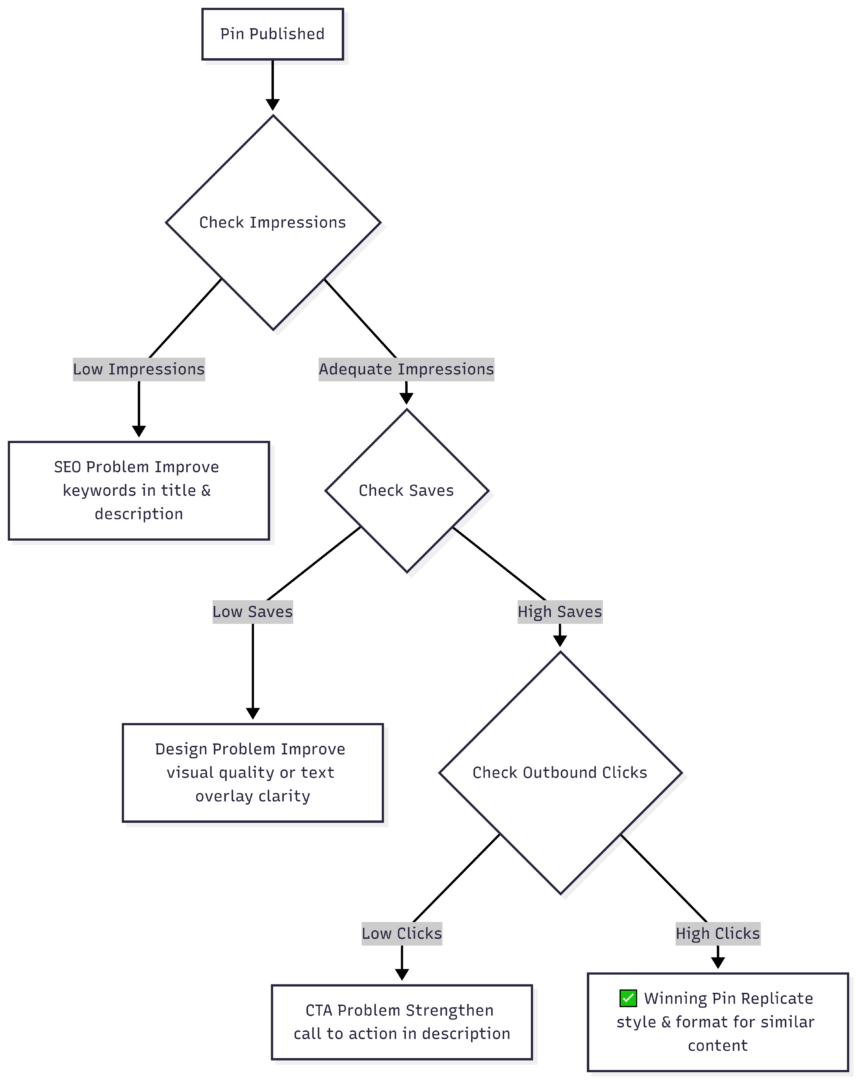
Run this diagnostic for your top 10 pins monthly. Identify which pin designs, topics, and description styles consistently generate outbound clicks. Double down on what the data confirms is working. Stop creating formats that generate saves but no traffic, or impressions but no engagement.
Beyond native analytics, adding UTM parameters to your pin URLs allows you to track Pinterest-referred traffic accurately inside Google Analytics or your preferred analytics platform. This closes the attribution loop and lets you connect Pinterest activity directly to business outcomes — email signups, purchases, page views — rather than stopping at platform-level metrics.
The Compounding Nature of Pinterest Growth
The most important thing to understand about Pinterest as a channel is that it does not behave like any other platform you have used. A pin you publish today can become your highest-traffic driver eighteen months from now, as the algorithm routes it to new audiences searching the same keywords. A post on Instagram dies in 48 hours. A well-optimized Pinterest pin is a permanent asset.
This creates a growth curve that feels flat early and steep later. New accounts commonly see minimal traction in the first 60–90 days, followed by accelerating growth as their pin library builds critical mass and the algorithm develops a clearer model of their content. Accounts that abandon the platform during the flat phase forfeit the compounding returns that would have followed.
Apply these ten optimizations systematically from the start: business account, keyword research, optimized profile, structured boards, vertical pin design, SEO-rich descriptions, consistent scheduling, Idea Pin reach, Rich Pin setup, and monthly analytics review. Each layer reinforces the others. The accounts that treat Pinterest as a long-term search asset — not a short-term social play — are the ones that generate organic traffic for years with no ad spend.
For further reading on keyword strategy and pin creation workflows, Pinterest’s own Business resource hub and Tailwind’s blog provide regularly updated guidance aligned with current algorithm behavior.
Please share this 10 Pinterest Optimization Tips for New & Small Accounts with your friends and do a comment below about your feedback.
We will meet you on next article.
Until you can read, The 10 Best Meal-Planning Apps