
4 Ways To Use Instagram Feed Pro by Smash Balloon
Instagram Feed Pro by Smash Balloon transforms how WordPress sites display Instagram content. This premium plugin connects directly to Instagram’s API as an approved partner, delivering reliable, customizable feeds without scraping or performance issues. It supports user timelines, hashtags, tagged posts, Reels, Stories, and shoppable links while optimizing for speed, mobile responsiveness, and GDPR compliance.
Businesses and creators use it to keep websites fresh, showcase visual content, build social proof, and drive traffic or sales. The plugin works seamlessly with any WordPress theme, requires no coding, and embeds via Gutenberg block, shortcode, or widget. Pro features unlock advanced layouts, visual moderation, analytics, and shoppable functionality that the free version lacks.
Below are the four primary ways to leverage Instagram Feed Pro, followed by setup guidance, full feature specifications, performance benefits, and pricing details.
1. Display Your User Timeline Feed
The user timeline feed pulls the latest photos, videos, Reels, and carousels straight from your personal, business, or creator Instagram account. It updates automatically, keeping your site dynamic without manual uploads.
Link your account once in the WordPress dashboard. The plugin fetches content via secure API access and caches it locally for fast loading. Choose how many posts appear (desktop, tablet, mobile breakpoints) and select from grid, masonry, carousel, or highlight layouts.
This feed excels for personal brands, e-commerce stores, or portfolios. It displays captions, likes, comments, and allows lightbox pop-ups for full-size viewing without leaving the site. Add a header with your profile avatar, bio, and “Follow on Instagram” button to encourage profile visits.
Benefits include higher time-on-site, improved SEO through fresh visual content, and stronger brand consistency. Combine it with other feed types in a single display for richer storytelling.
2. Showcase Public Hashtag Feeds
Hashtag feeds display public posts using specific hashtags, ideal for campaigns, events, or user-generated content. As an Instagram-approved partner, Instagram Feed Pro accesses hashtag data directly through the API—no scraping required.
Create a feed by entering one or more hashtags. Filter for top or recent posts and moderate visually to approve or hide results. This approach highlights community engagement, product mentions, or seasonal campaigns without managing every post manually.
Use it on landing pages, blog sidebars, or dedicated campaign sections. Layout options let you match your site’s aesthetic—carousel for horizontal scrolling or masonry for Pinterest-style grids. Add filters to include or exclude words/phrases in captions for precise control.
Hashtag feeds boost discoverability, encourage participation, and serve as social proof. They keep content evergreen while staying relevant to trending topics.
3. Create Shoppable Feeds
Turn Instagram visuals into direct sales drivers with shoppable feeds. Link any post to a product page, collection, or external URL by adding the link in the Instagram caption. The plugin detects it automatically and adds a clickable “Shop Now” button or overlay.
This feature works with user timelines, hashtag feeds, or mixed sources. Visitors browse your Instagram-style gallery and convert without switching tabs. Perfect for WooCommerce stores, fashion brands, or product showcases.
Customize button text, colors, and position to match your branding. Track performance through the built-in analytics dashboard, which shows clicks, top-performing posts, and engagement metrics—all inside WordPress.
Shoppable feeds shorten the path from inspiration to purchase, increasing conversion rates and ROI on Instagram marketing.
4. Create Custom, Moderated Feeds
Visual moderation tools give complete control over displayed content. Hand-pick posts, hide specific users or photos, or create rules based on hashtags, keywords, or post IDs. Highlight key posts using patterns, IDs, or caption hashtags (e.g., #highlight).
Combine multiple feed types—user timeline + hashtag + tagged posts—into one unified display. Choose layouts (grid, carousel, masonry, highlight) and apply pre-built themes or custom CSS for pixel-perfect design.
Moderation happens in a live preview editor. Changes appear instantly, eliminating guesswork. This flexibility suits brands needing family-friendly content, seasonal curation, or compliance-focused displays.
Custom feeds ensure every element aligns with your brand voice and marketing goals while maintaining a polished, professional appearance.
Why Instagram Feed Pro Stands Out: Key Features and Specifications
Instagram Feed Pro offers more than basic embedding. Here are the core capabilities:
- Layouts and Design: Grid, carousel, masonry, highlight. 12+ pre-built templates and professional themes for instant styling.
- Media Support: Photos, videos, Reels, carousels, and Stories (pop-up lightbox via header avatar).
- Performance Optimizations: Smart caching with backup system, local image resizing and storage (bypasses large Instagram CDN files), minimal external requests, and page-speed focus. Site health alerts notify of issues.
- Moderation and Filtering: Visual moderation tool, word/phrase filters, post ID or hashtag highlighting, exclude specific users.
- Shoppable and Interactive: Caption-based URL linking, lightbox with comments/likes, easy share buttons to social networks.
- Additional Feeds: Tagged posts, mixed feed types in one display.
- Customization Depth: Color schemes (light/dark/custom), header options (avatar, bio, styles), button controls, mobile-specific settings, developer-friendly templating and hooks for advanced HTML overrides.
- Compliance and Reliability: One-click GDPR mode (no third-party requests), WPML multilingual support, international text translation.
- Embedding Options: Gutenberg block, shortcode, widget. Restores Instagram oEmbed support for WordPress.
- Analytics Dashboard: Real-time engagement metrics, top posts breakdown, all accessible in the WordPress admin—no external tools needed.
The plugin inherits your theme’s styles by default, requiring zero technical knowledge for basic use. Advanced users access hooks and templates for deeper customization.
Pro vs Free Feature Comparison
| Feature | Free Version | Instagram Feed Pro |
|---|---|---|
| Feed Types | User timeline only | User, hashtag, tagged, mixed |
| Layouts | Grid only | Grid, carousel, masonry, highlight |
| Moderation | Basic | Visual moderation + filters |
| Shoppable links | No | Yes (caption URL) |
| Lightbox + Comments | Limited | Full with likes/comments |
| Stories display | No | Pop-up lightbox |
| Caching & Performance | Basic | Smart backup + local images |
| Analytics | No | Full dashboard |
| GDPR one-click | No | Yes |
| Multiple feeds per page | Limited | Unlimited + combinable |
| Developer templating/hooks | No | Yes |
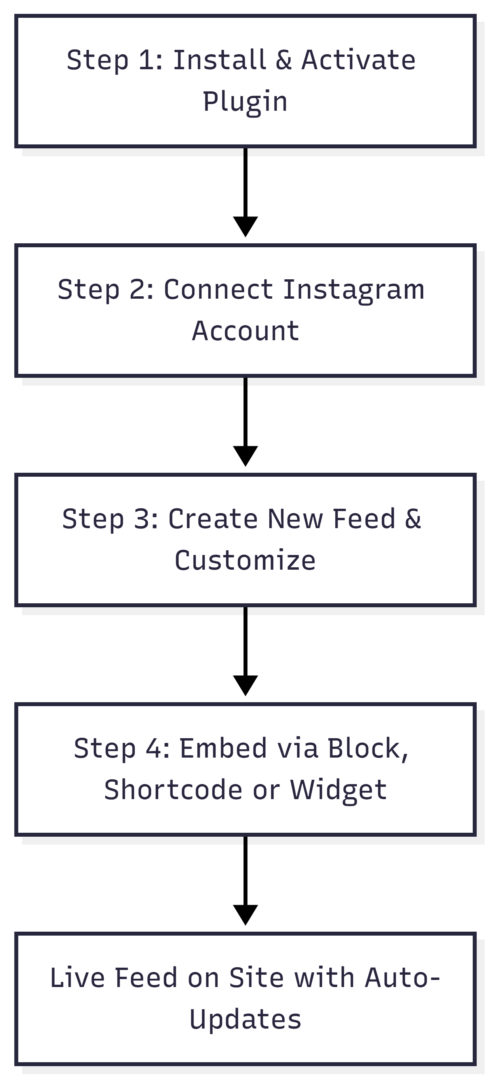
How to Create a WordPress Instagram Feed with Smash Balloon (4 Simple Steps)
Setting up Instagram Feed Pro takes under 60 seconds for most users.
- Install and Activate
Go to Plugins > Add New, search “Smash Balloon Social Photo Feed,” install the free version, then upgrade to Pro via license key. Activate and run the setup wizard. - Connect Your Instagram Account
Authorize your personal, business, or creator account. The plugin handles API connection securely. Skip and configure later if preferred. - Create and Customize the Feed
Navigate to Instagram Feed > Add New. Select feed type (user timeline, hashtag, etc.). Choose source account(s). Use the visual customizer to adjust layout, colors, header, number of posts, columns, and moderation rules. Live preview shows changes instantly. - Embed Anywhere
Copy the shortcode, add the Gutenberg “Instagram Feed” block, or place in a widget area (header, footer, sidebar). Publish and the feed appears live.
The intelligent caching ensures posts load even during Instagram outages. Health alerts email you if action is required.
Analytics, Support, and Reliability
The in-dashboard analytics page tracks engagement across all feeds: impressions, clicks, top posts, and audience insights. No guesswork—optimize based on real data.
Support is a standout feature. Expert developers respond quickly with knowledgeable, solution-focused help. The plugin includes reliability tools: backup caching, automatic alerts, and site health integration.
Pricing for Instagram Feed Pro
Instagram Feed Pro uses annual licensing with options for different site needs:
- Basic: Starts at $49/year – 1 site (core Pro features)
- Plus: Starts at $99/year – 5 sites
- Elite: Starts at $149/year – 10 sites
- All Access Bundle: Starts at $299/year – Unlimited sites + all Smash Balloon plugins (Facebook, YouTube, TikTok, etc.)
All plans include one year of updates and priority support. A 30-day money-back guarantee removes risk. Renewals occur at standard rates after the introductory period.
Choose based on your website count and whether you need multiple social plugins.
Final Thoughts: Elevate Your WordPress Site with Instagram Feed Pro
Instagram Feed Pro by Smash Balloon delivers the most flexible, reliable way to display Instagram content on WordPress. Whether you need simple user timelines, dynamic hashtag curation, revenue-driving shoppable galleries, or fully moderated custom feeds, the plugin handles it all with speed, style, and built-in analytics.
Its combination of ease of use, performance optimizations, and advanced features makes it the top choice for businesses serious about social integration. Embed unlimited feeds, customize endlessly, and watch engagement grow—all without leaving your WordPress dashboard.
Ready to implement these four powerful uses? Install Instagram Feed Pro today and start displaying Instagram content that works as hard as your website does. Your visitors—and your conversion rates—will thank you.
Please share this 4 Ways To Use Instagram Feed Pro by Smash Balloon with your friends and do a comment below about your feedback.
We will meet you on next article.
Until you can read, Aperol Spritz with a Pomegranate Twist