
Why Are My Google Rich Results Missing?
You’ve implemented structured data. The Rich Results Test shows everything as valid. Your competitors display star ratings and review snippets in search results. Yours don’t. This exact scenario frustrates thousands of WordPress site owners, and the cause is almost never what they expect.
This guide covers the complete picture: why Google validates your structured data but still refuses to display rich results, the specific violations that trigger suppression, how WordPress plugins interact with markup, and the exact steps to restore eligibility.
How Google Decides Whether to Show Rich Results
Passing the Rich Results Test means your markup is syntactically correct. It does not mean Google will display rich results. These are two separate decisions made by two separate systems.
Google’s documentation states this explicitly: structured data enables a feature to be eligible, not guaranteed. The algorithm evaluates several additional factors before rendering a rich snippet in search results.
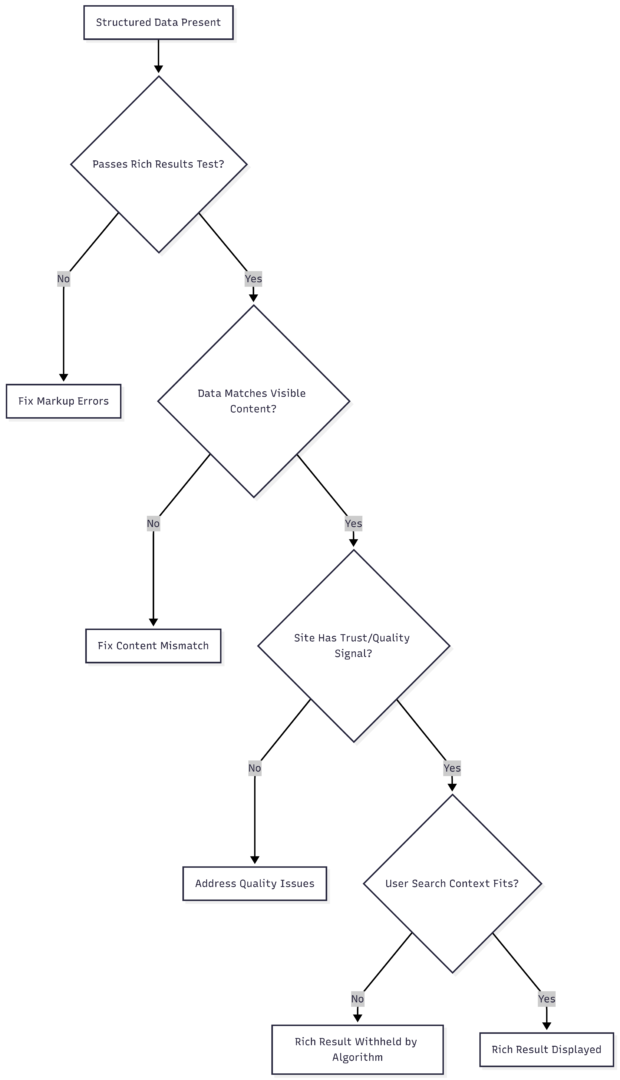
The critical factor most site owners skip is step F: trust. Google scores your structured data against the quality and credibility signals of the entire site. A site with thin content, manipulated metrics, or guideline violations will have its structured data suppressed even if the markup is technically perfect.
The Trust Problem: Why Google Ignores Valid Markup
When a site’s rich results appear with site:domain.com searches but not in regular queries, this is almost always a trust signal issue, not a technical one.
The site: command forces Google to show indexed content regardless of quality scoring. Normal search queries run through the full ranking and trust evaluation pipeline. If your rich results appear in one but not the other, your markup is indexed and valid — Google simply doesn’t trust it enough to display it in user-facing results.
What Destroys Structured Data Trust
Fabricated review counts and ratings are the most common cause. A site that imports ratings from Google Play, the App Store, or any third party and marks them up as native reviews violates Google’s review snippet guidelines directly. The guideline states: do not aggregate reviews from other websites.
Beyond the policy violation, Google cross-references review counts. If your page shows 34,000 reviews but users cannot submit reviews on the page itself, the data is flagged as fraudulent. Google’s systems recognize this pattern reliably.
Rating counts that don’t match actual votes trigger the same suppression. Using post view counts as ratingCount values — a common workaround to avoid validation errors — is detectable and treated as manipulation.
Mismatched data between markup and visible content causes immediate suppression. Your structured data must reflect exactly what a user can see and interact with on the page. If the markup says a product costs $29 but the page shows $49, or claims 500 reviews exist but only 3 are visible, Google treats this as deceptive markup.
Common Structured Data Violations by Type
| Schema Type | Common Violation | Google’s Response |
|---|---|---|
| Review / AggregateRating | Aggregating third-party ratings (Play Store, IMDb) | Rich result suppressed sitewide |
| AggregateRating | Using page views as ratingCount | Flagged as manipulative |
| Product | Price/availability mismatch with visible content | Individual page suppression |
| SoftwareApplication | Reviews not visible or submittable on page | Schema invalidated |
| Article | Author markup without corresponding author page | Ignored, not displayed |
| FAQ | Questions not visible in page content | Content policy violation |
| Review | Reviews not written by users of the page | Suppressed per guidelines |
WordPress-Specific Causes
WordPress sites face additional complexity because structured data often comes from multiple sources simultaneously: the theme, SEO plugins, and schema-specific plugins. Conflicting or duplicate markup confuses Google’s parser and can cause all markup to be ignored.
Plugin Conflicts
Installing both Yoast SEO and Rank Math, or using a schema plugin alongside either, frequently generates competing JSON-LD blocks. Google may receive two different @type: Product definitions for the same page, making it impossible to determine which is authoritative.
Audit your markup sources:
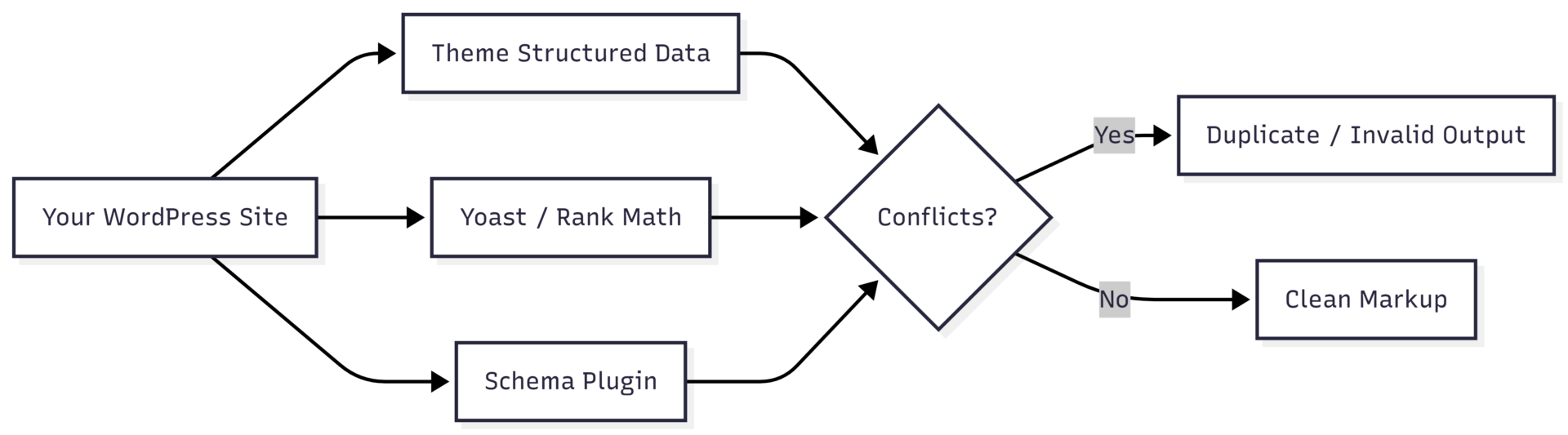
To check what your site is actually outputting, view the page source and search for application/ld+json. Count how many blocks appear and whether they contain conflicting data for the same entity.
Theme-Generated Markup Gaps
Many themes generate partial structured data. A theme might output Product schema without image or description properties, which are required fields for Product rich results. Google Search Console will report these as missing required fields. This is not always an error in your SEO plugin — it can be the theme generating incomplete base markup that your plugin doesn’t override.
The BigCommerce/theme scenario described by many users applies equally to WordPress: if a theme generates incomplete schema and your SEO plugin generates a separate complete schema block, you now have duplicate markup where one is incomplete. Google may parse the incomplete version.
Solution: Disable structured data output from your theme if your SEO plugin handles it fully. Most major SEO plugins have a setting to suppress theme-generated schema.
Cached or Outdated Markup
WordPress caching plugins (WP Rocket, W3 Total Cache, LiteSpeed Cache) can serve stale markup after you update your structured data. Always purge caches after making schema changes, then re-test with the Rich Results Test.
How to Diagnose the Actual Problem
Step 1: Run the Rich Results Test
Go to search.google.com/test/rich-results and enter your page URL. Note:
- Whether items are detected
- Whether items are valid or have errors/warnings
- Which schema types are present
Step 2: Check Google Search Console
Navigate to Enhancements in Search Console. Each schema type you’ve implemented should have its own section showing valid items, warnings, and errors. Pages with errors will not receive rich results. Pages with warnings may or may not receive them.
Step 3: Cross-Reference Data Claims Against Page Content
For every structured data property making a factual claim (rating, review count, price, availability, author), verify that the same information is visible to users on the page without requiring any action. If users cannot see a rating, cannot submit a review, or cannot verify a price, the markup violates display guidelines.
Step 4: Check for Manual Actions
In Google Search Console, navigate to Security & Manual Actions > Manual Actions. A manual action against structured data will explicitly suppress rich results. This is different from algorithmic suppression and requires submitting a reconsideration request after fixing violations.
Step 5: Inspect the site: Gap
Search Google for site:yourdomain.com and look at sample results. If structured data appears in these results but not in organic queries for the same pages, you have a trust/quality issue rather than a technical one.
Fixing the Review Rating Problem for App/Software Sites
Sites that review software, apps, or products they do not manufacture face a structural problem: they cannot generate native user reviews that comply with Google’s guidelines, but they want to display rating data.
The compliant approach:
- Build a native review system. Allow users to submit ratings directly on your site. Display these ratings visibly. Mark up only the ratings that users submitted on your platform.
- Do not import ratings from app stores. Even if the data is accurate, aggregating third-party ratings violates the review snippet policy.
- Use a different schema type. For editorial reviews written by your team, use
Reviewschema with your organization as the author. This does not require a ratingCount but allows a ratingValue if your editorial team assigned one. - Mark up only what exists. If you have zero native reviews, use no AggregateRating markup. An empty or fabricated ratingCount is worse than no markup at all.
Restoring Rich Result Eligibility: Step-by-Step
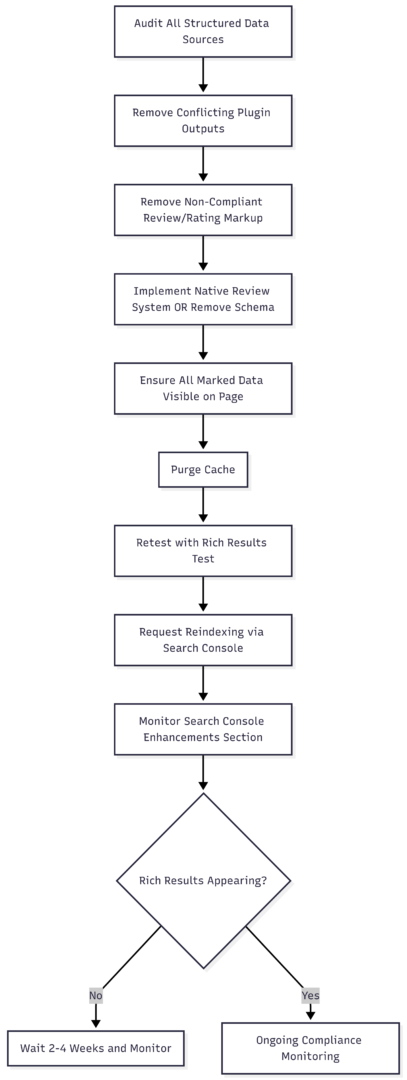
Recovery is not immediate. After fixing violations, Google needs to recrawl your pages and re-evaluate trust signals. This typically takes two to eight weeks for small sites and longer for sites that previously engaged in systematic manipulation. Use the URL Inspection tool in Search Console to request priority crawling of your most important pages.
Structured Data Best Practices for WordPress
| Practice | Implementation |
|---|---|
| Single source of truth | Choose one plugin for schema output; disable all others |
| Match markup to content | Every structured data claim must be visible on the page |
| No third-party rating aggregation | Only mark up ratings collected on your own platform |
| Required fields present | Use Google’s documentation to verify all required properties |
| Cache management | Purge after every schema update |
| Regular Search Console audits | Check Enhancements weekly for new errors |
| Image compliance | Structured data images must be crawlable, not in JavaScript lightboxes |
| Mobile parity | Ensure structured data renders correctly on mobile (Googlebot uses mobile-first indexing) |
When Correct Markup Still Doesn’t Show
After fixing all violations and waiting for recrawl, some pages still may not display rich results. This is expected behavior. Google’s documentation confirms the algorithm may determine that a plain link provides a better user experience than a rich result for certain queries or users.
Factors that reduce rich result display even with valid markup include:
- Query type doesn’t benefit from the schema type implemented
- User’s search history or location suggests different result format is preferred
- Competing results in the same SERP already show rich results of that type
- Page authority is lower than competing pages that also have valid markup
In these cases, the correct response is to continue improving content quality and acquiring legitimate links rather than adjusting markup further. Rich result eligibility is a floor, not a ceiling — it makes you eligible, but authority and relevance determine whether you win the display slot.
Summary
Rich results not appearing despite valid structured data almost always points to one of three causes: data quality violations (especially fabricated ratings), conflicting markup from multiple WordPress plugins, or missing required fields from incomplete theme-generated schema.
The fastest path to resolution is to audit what’s actually in your page source, remove any review or rating markup that doesn’t reflect native user-generated content on your own platform, ensure a single plugin controls your schema output, and verify every marked-up property is visible in the page content. After fixing violations, request recrawling through Search Console and monitor the Enhancements section over the following weeks.
Technical validity is the starting point. Compliance with content guidelines is what actually earns the display.
Please share this Why Are My Google Rich Results Missing? with your friends and do a comment below about your feedback.
We will meet you on next article.
Until you can read, How to fix the Missing field: “url” warning