Chatgpt to help your Food Photography Business
Running a food photography business means wearing a lot of hats — creative director, marketing manager, client coordinator, and accountant, all before you even pick up your camera. ChatGPT changes this equation by taking on the administrative and strategic workload so you can focus on what you actually do best: making food look irresistible.
This guide breaks down exactly how to put ChatGPT to work across every part of your business — from generating client-ready documents to coaching you through a live photoshoot.
What ChatGPT Actually Does for Food Photographers
ChatGPT is a large language model that generates, refines, and analyzes text based on your prompts. The newer versions (GPT-4 and above) are multimodal, meaning they can also accept images as input and generate images via DALL-E. For food photographers, this opens up applications across six core areas:
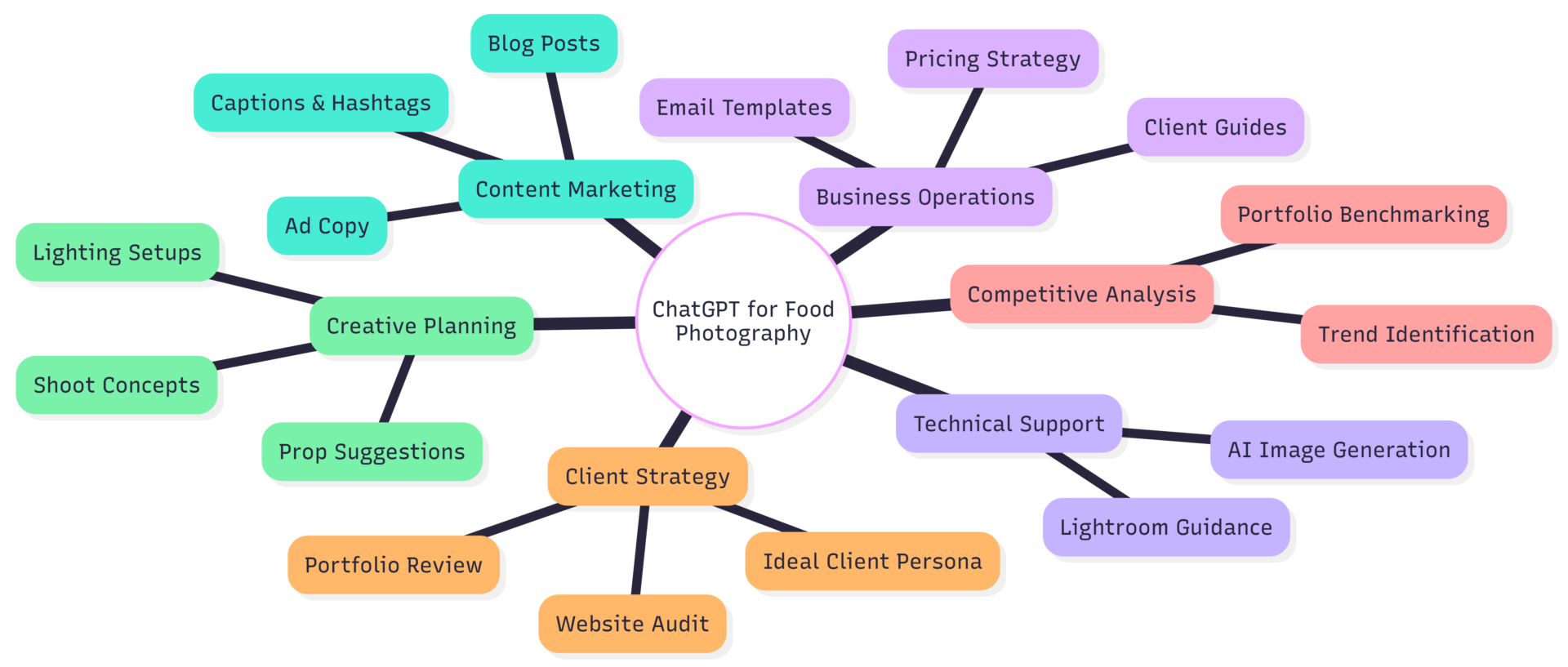
1. Creating Business Documents in Minutes
Proposals, client questionnaires, welcome guides, and contracts are essential — and time-consuming to write from scratch. ChatGPT generates solid base templates quickly, which you then customize per client.
How to do it: Describe your business type and the document you need. For example: “Write a photography proposal for a high-end restaurant client. Include an overview section, deliverables, timeline, and pricing placeholder.”
Once you have the template, refine it by prompting: “Rewrite the tone to feel warmer and more premium, aligned with a fine-dining brand.”
Documents ChatGPT handles well:
| Document Type | Time Saved | Customization Needed |
|---|---|---|
| Client proposal | 60–90 min → 10 min | High (per client) |
| Welcome guide | 2–3 hours → 20 min | Low |
| Email templates | 30 min → 5 min | Medium |
| Pricing sheet copy | 45 min → 15 min | Medium |
| Standard operating procedures | 2+ hours → 30 min | Low |
The key is treating ChatGPT’s output as a first draft, not a finished product. Your voice, brand tone, and specific details still need to be layered in — but that’s far faster than starting with a blank page.
2. Streamlining Client Communication
Cold outreach is one of the biggest hurdles for food photographers trying to land brand clients. Most people send generic emails that get ignored. ChatGPT helps you craft targeted pitches that speak to a specific brand’s identity.
Practical workflow:
- Share a brand’s website URL with ChatGPT and ask it to identify their visual aesthetic, target audience, and current marketing tone.
- Ask it to generate three pitch angles based on that analysis.
- Have it write a cold email using the best angle.
Beyond pitching, ChatGPT can audit your entire client journey. Share your current onboarding process step by step and ask: “Where are the friction points? What could I automate or improve?” It often surfaces ideas like adding an automated questionnaire after booking, creating a shoot-prep guide for clients, or building an upsell path (e.g., offering recipe development alongside photography).
Sample prompt for process improvement:
“Here’s my current client process: inquiry → discovery call → proposal → deposit → shoot → delivery → follow-up. Suggest three ways to streamline this for a one-person food photography business.”
3. Portfolio Analysis and Competitive Research
Your portfolio is doing a job — or it isn’t. ChatGPT can help you figure out which.
Upload your portfolio link (or paste in descriptions of your images) and ask: “What type of client does this portfolio attract? What brand categories does this work NOT speak to?” The analysis often reveals gaps you’ve been too close to see yourself — like having strong restaurant work but no packaged goods shots, making you invisible to CPG brands.
You can run the same analysis on competitor portfolios. Identify what makes their work appealing, then ask: “How can I position my portfolio to differentiate from this competitor while still targeting the same client type?”
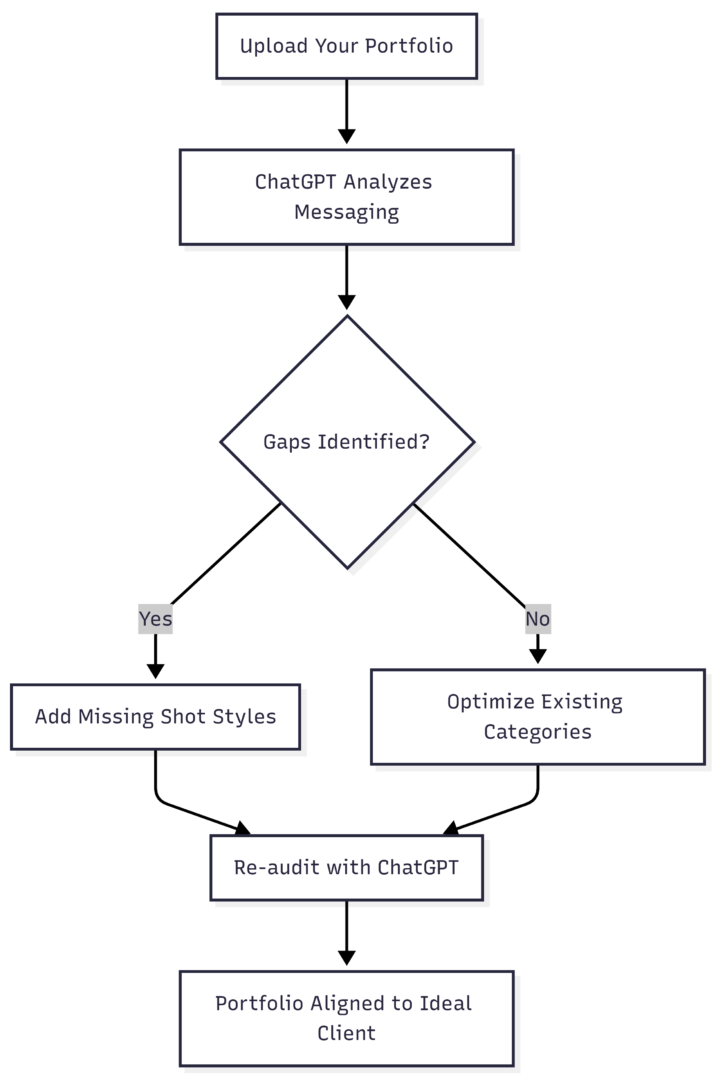
This is especially useful if you’re trying to break into a new market — say, moving from local restaurants to national food brands. ChatGPT helps you understand what those brands look for before you start reshaping your book.
4. Defining Your Ideal Client Persona
Vague targeting produces vague results. ChatGPT helps you build specific, actionable client personas — not just “restaurants” but “independent farm-to-table restaurants in mid-sized cities with a marketing budget of $2,000–$5,000/month who post on Instagram daily.”
How to build a persona: Prompt: “I’m a food photographer specializing in natural light, moody editorial work. Help me define my ideal client persona — include their business type, marketing challenges, content needs, budget range, and what language resonates with them.”
Then go deeper: “What objections might this client have when hiring a food photographer, and how should I address them in my marketing copy?”
This persona becomes the lens through which you write every caption, email, and website page. The more specific it is, the more your marketing feels like it was written directly for the person reading it.
5. Content Marketing: Captions, Blogs, and Ad Copy
Food photography is inherently visual, but the text around your images drives discovery and conversion. ChatGPT handles the full content stack:
Instagram captions: Feed it an image description, your brand tone (editorial, warm, technical), and target audience. It generates multiple caption options with relevant hashtags grouped by category (niche, broader reach, location-based).
Blog posts: Blog content builds long-term SEO traffic. ChatGPT can outline, draft, and optimize posts around topics like “How to prepare your restaurant for a food photoshoot” or “5 things that make food photography worth the investment.” These posts target the search terms your ideal clients are actually using.
Ad copy: For Meta or Google campaigns, ChatGPT drafts headline-body-CTA combinations quickly. Feed it your target persona and the specific offer (e.g., a half-day shoot package) and ask for five variations to A/B test.
| Content Type | ChatGPT Use Case | Human Input Required |
|---|---|---|
| Instagram captions | Generate options with hashtags | Select + personalize tone |
| Blog post drafts | Full structure + SEO optimization | Fact-check + add personal examples |
| Email sequences | Welcome series, follow-up cadence | Brand voice alignment |
| Ad copy | Multiple headline/body variants | Strategic offer decisions |
| Client-facing PDFs | Educational guides + shoot prep docs | Design + formatting |
6. Creative Planning: Shoot Concepts, Props, and Lighting
This is where ChatGPT’s multimodal capabilities become genuinely exciting for working photographers.
Planning before the shoot: Give ChatGPT a client brief — cuisine type, brand tone, intended platform — and ask for a full shot list, prop suggestions, color palette, and lighting setup. For example: “I’m shooting a rustic fall menu for a farmhouse restaurant. Generate a 10-shot list with prop ideas, backdrop suggestions, and recommended lighting direction for each shot.”
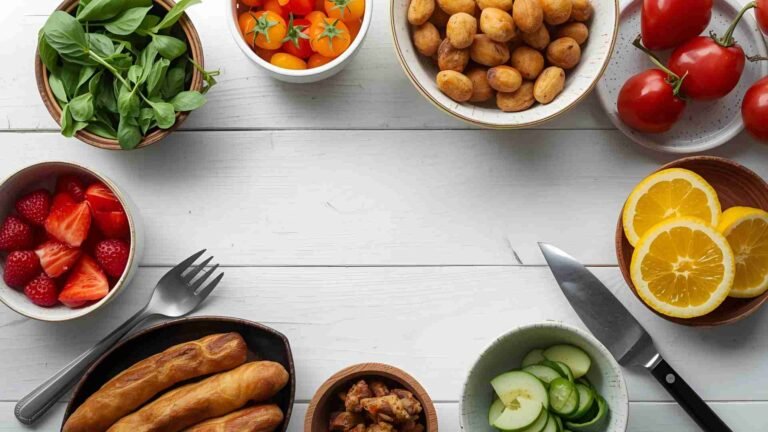
Choosing props from your existing inventory: Photograph your plates, backdrops, and fabrics, then upload those images. Ask ChatGPT to evaluate which combinations work for the brief you’ve been given. It can identify each item, describe its aesthetic qualities, and recommend pairings — a genuine time-saver during pre-production.
Rendering inspiration images: For GPT-4 users, you can ask ChatGPT to generate a rendered reference image showing your actual props arranged for the shot. This isn’t a finished photo — it’s closer to a rough sketch — but having a visual target significantly improves how efficiently you set up on shoot day.
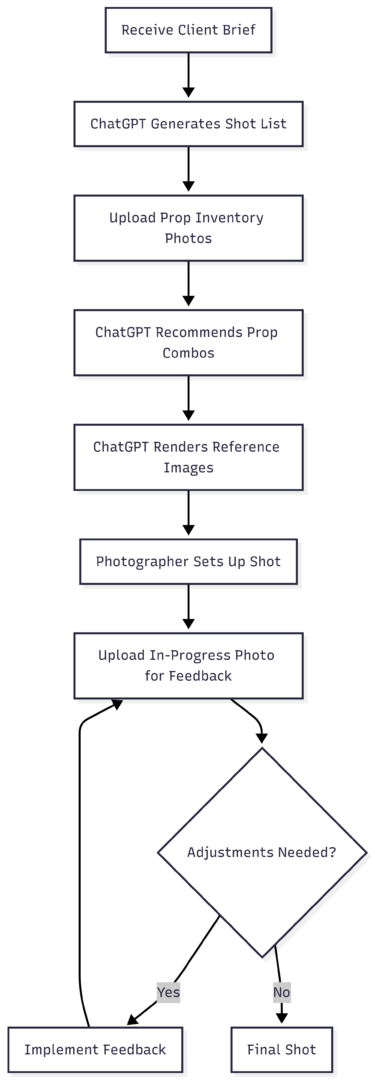
7. Real-Time Feedback During the Shoot
This is the most advanced application — using ChatGPT as a live photography coach.
The workflow: shoot a test frame, upload it to ChatGPT, and ask for specific feedback. “What’s working and what isn’t? How should I adjust the composition, lighting, and props?”
The feedback loop typically progresses like this:
Iteration 1 — Technical issues: ChatGPT addresses the basics first — focus, exposure, noise. If the image is blurry, it explains why and suggests fixes (tripod, aperture adjustment, shutter speed).
Iteration 2 — Composition: Once the technical issues are resolved, it moves to composition. Common suggestions include using the rule of thirds, placing a hero element in the foreground with secondary elements softly blurred behind it, and removing visual clutter.
Iteration 3 — Styling: At this stage it suggests prop additions or removals. Sprinkle powdered sugar, add a small bowl of ingredients, remove the extra fork.
Iteration 4 — Post-processing: After the final frame is shot, it gives editing direction — white balance, contrast, vignette, saturation adjustments.
This process doesn’t replace developing your own eye over time. But it accelerates the learning curve significantly, especially for photographers transitioning from casual to professional work. The feedback mirrors what you’d receive in a structured food photography course, but it’s applied directly to your specific image in real time.
Pricing and Tools
| Tool | Plan | Monthly Cost | Key Feature |
|---|---|---|---|
| ChatGPT (OpenAI) | Free | $0 | GPT-3.5, text only |
| ChatGPT Plus | Paid | $20/month | GPT-4o, image input/output, DALL-E |
| ChatGPT Team | Business | $30/user/month | Shared workspace, no data training |
| Claude (Anthropic) | Free/Pro | $0 / $20/month | Strong long-form writing, document analysis |
| Midjourney | Paid | $10–$60/month | Higher quality AI image generation |
For most food photographers, ChatGPT Plus at $20/month covers everything in this guide — document creation, portfolio analysis, content generation, and live shoot feedback with image input. If you need higher-quality reference image generation, pairing ChatGPT Plus with a Midjourney subscription gives you more photorealistic visual mockups.
Limitations to Keep in Mind
ChatGPT is a tool, not a replacement for your expertise or voice. A few things it doesn’t do well:
- Brand voice accuracy on the first pass: You’ll always need to edit outputs to match your specific tone. Treat every output as a starting draft.
- Photorealistic image generation: The rendered reference images are useful for composition planning but won’t fool anyone into thinking they’re photographs. For client-facing mockups, use the references internally only.
- Knowing your specific market: ChatGPT doesn’t know your local restaurant scene, the specific clients you’ve worked with, or the niche dynamics of your market. You have to supply that context explicitly in your prompts.
- Consistency across sessions: ChatGPT doesn’t remember previous conversations by default. Keep a running document of your brand guidelines, client personas, and preferred prompt formats so you can paste context quickly at the start of each session.
Putting It Together
The photographers who get the most from ChatGPT are the ones who integrate it into their actual workflow rather than treating it as a novelty. Start with one area — client emails, or a shot list for your next booking — and build the habit from there.
As you get comfortable writing prompts, you’ll find the tool saves several hours a week on administrative work, sharpens your marketing messaging, and adds a useful creative sounding board to your pre-production process. That time compounds quickly into more shoots, better clients, and faster skill development.
The camera work is yours. ChatGPT handles the rest.
Please share this Chatgpt to help your Food Photography Business with your friends and do a comment below about your feedback.
We will meet you on next article.
Until you can read, 10 Wacky Food Photography Terms And What They Mean