
Learn how to update old blog content for SEO to boost rankings, drive traffic, and enhance user experience with proven strategies.
In the ever-evolving world of digital marketing, maintaining the relevance and performance of your website’s content is crucial for staying competitive. Search Engine Optimization (SEO) isn’t just about creating new content—it’s also about breathing new life into older blog posts to ensure they continue to drive traffic, engage users, and rank well on search engine results pages (SERPs). Updating old blog content for SEO is a strategic, cost-effective way to maximize your existing assets, improve user experience, and align with Google’s preference for fresh, high-quality content.
This comprehensive guide explores why updating old content matters, how to identify posts that need refreshing, and actionable strategies to optimize them. Backed by real-world data and insights, this article provides a step-by-step approach to help you enhance your SEO performance, boost click-through rates, and leverage the full potential of your blog archives.
Why Updating Old Blog Content Matters
Old blog posts often represent a goldmine of untapped potential. According to HubSpot, 89% of their blog traffic comes from posts published at least six months prior, highlighting the value of historical content. However, as industries, technologies, and user behaviors evolve, older content can become outdated, irrelevant, or less competitive in search rankings. Google’s algorithms, including updates like the 2020 freshness signal and the E-E-A-T (Experience, Expertise, Authoritativeness, Trustworthiness) framework, prioritize fresh, accurate, and user-focused content.
Refreshing old content offers several benefits:
- Improved Rankings: Updated content signals freshness to Google, increasing the likelihood of higher SERP positions.
- Increased Traffic: Optimized posts can attract more clicks by targeting current keywords and user intent.
- Enhanced User Experience: Fresh, accurate content keeps visitors engaged, reducing bounce rates.
- Cost-Effective Strategy: Updating existing posts requires less effort than creating new ones, delivering faster results.
- Broader Keyword Reach: Refreshed content can rank for new or trending keywords, expanding your audience.
By systematically updating your old blog posts, you can maintain a vibrant, high-performing website that aligns with both user expectations and search engine requirements.
Identifying Content That Needs a Refresh
Before diving into optimization, you need to identify which blog posts require attention. Conducting a content audit is the first step to uncovering underperforming or outdated content. Here’s how to do it:
Step 1: Conduct a Content Audit
Use tools like Google Analytics, Google Search Console, or Semrush to analyze your blog’s performance. Focus on the following metrics:
- Low Traffic Pages: Identify posts with declining or stagnant traffic over the past 6–12 months.
- High Bounce Rates: Pages with high bounce rates may indicate irrelevant or outdated content.
- Declining Rankings: Check for posts that have dropped in keyword rankings or lost visibility in SERPs.
- Outdated Information: Look for posts containing old data, broken links, or references to obsolete trends.
- High-Potential Pages: Prioritize evergreen content or posts ranking on the second page of Google (positions 11–20), as these have the potential to jump to page one with optimization.
Step 2: Prioritize Content for Updates
Not all posts are worth refreshing. Focus on:
- Evergreen Content: Topics that remain relevant over time, such as “How to Start a Blog” or “SEO Best Practices.”
- High-Conversion Pages: Posts that drive leads, sales, or other key performance indicators (KPIs).
- Competitive Opportunities: Pages close to ranking in the top 3 for valuable keywords.
- Outdated but Relevant Topics: Posts that can be updated with new data, trends, or examples.
Example Data: Content Audit Metrics
| Metric | Threshold for Action | Example Tool |
|---|---|---|
| Traffic Decline | >20% drop in 6 months | Google Analytics |
| Bounce Rate | >70% | Google Analytics |
| Keyword Ranking Drop | Dropped >5 positions | Semrush, Ahrefs |
| Broken Links | Any broken internal/external links | Broken Link Checker |
| Page Load Time | >3 seconds | Google PageSpeed |
By systematically auditing your content, you can create a prioritized list of posts to update, ensuring maximum impact on your SEO efforts.
Strategies for Updating Old Blog Content
Once you’ve identified the content to refresh, it’s time to implement proven SEO strategies. Below are detailed, actionable steps to optimize your old blog posts effectively.
1. Refresh and Update Content
Refreshing content involves updating information, improving readability, and enhancing engagement. Here’s how:
- Add New Information: Incorporate recent statistics, studies, or examples. For instance, if a post references 2018 SEO trends, update it with 2025 data from authoritative sources like Moz or Search Engine Journal.
- Expand Thin Content: Flesh out sections with additional details, case studies, or subtopics. For example, a post on “Social Media Marketing” could add a section on emerging platforms like Threads.
- Improve Readability: Break up long paragraphs, use clear headings (H2, H3), and add bullet points or numbered lists. Aim for a Flesch Reading Ease score above 60 for better accessibility.
- Update Visuals: Replace outdated images or add new ones, such as infographics or screenshots. Ensure images are optimized for web (under 200 KB) and include descriptive alt text.
- Fix Broken Links: Use tools like Broken Link Checker to identify and repair broken internal or external links. Replace dead links with relevant, high-authority resources.
- Remove Outdated Information: Delete references to obsolete tools, trends, or data. For example, remove mentions of Google+ or outdated SEO tactics like keyword stuffing.
- Optimize for Featured Snippets: Structure content with concise answers, lists, or tables to target Google’s featured snippet positions.
Example: A blog post titled “What is a Shadow Ban?” saw a 96% increase in clicks after updating its metadata, terminology (from “ghostbanning” to “shadowbanning”), and keyword targets. The refresh aligned the post with current user intent, resulting in 53,755 clicks post-update compared to 27,783 pre-update.
2. Optimize Keywords and Search Intent
Keyword optimization ensures your content aligns with what users are searching for today. Follow these steps:
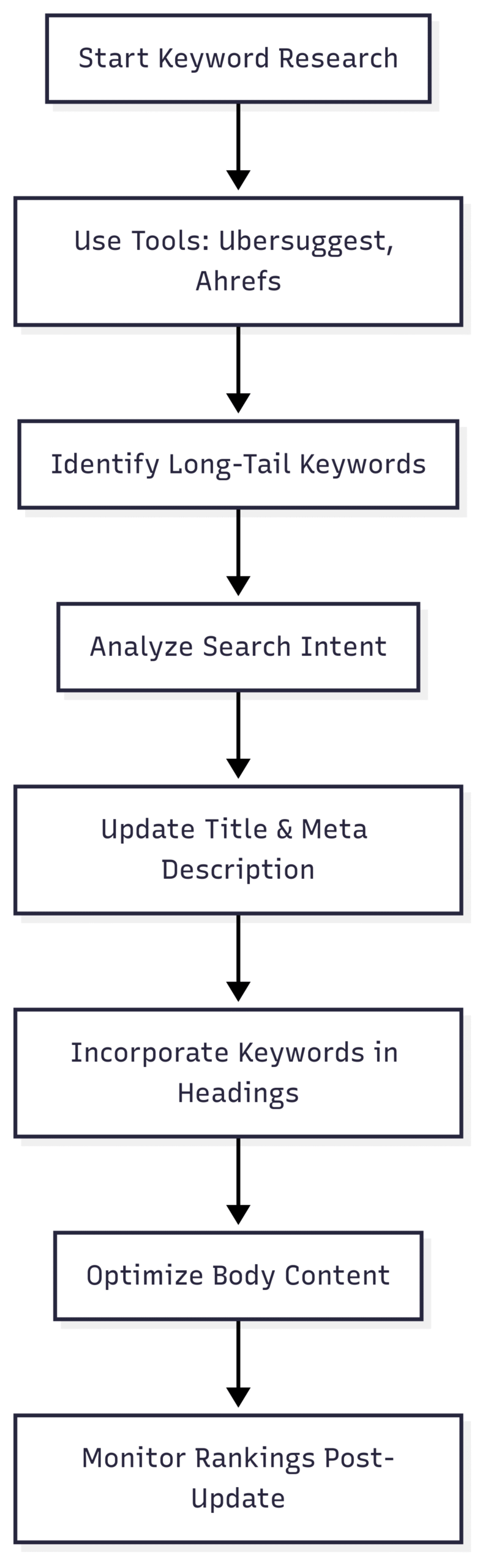
- Conduct Keyword Research: Use tools like Ubersuggest, Ahrefs, or Semrush to identify high-ROI keywords, especially long-tail phrases with lower competition but higher conversion potential.
- Target Search Intent: Align content with informational (e.g., “how to”), navigational (e.g., brand searches), or transactional (e.g., “buy now”) intent. For example, a post on “Best SEO Tools” should focus on tools users are currently searching for, like Surfer SEO or Screaming Frog.
- Incorporate Keywords Naturally: Place keywords in the title, meta description, headings, and body text without overstuffing. Aim for a keyword density of 1–2%.
- Update Metadata: Craft compelling meta titles (under 60 characters) and descriptions (under 160 characters) that include primary keywords and a call to action.
Chart: Keyword Optimization Workflow
3. Enhance On-Page SEO
On-page optimization improves technical aspects that impact user experience and search rankings:
- Improve Page Speed: Optimize images (compress to WebP format), minify CSS/JavaScript, and leverage browser caching. Aim for a page load time under 2 seconds.
- Optimize URLs: Use short, descriptive URLs that include primary keywords (e.g.,
/update-old-blog-content-seo). - Add Internal Links: Link to related posts or high-value pages on your site to improve navigation and distribute link equity.
- Include External Links: Link to authoritative sources (e.g., Google’s Webmaster Blog) to enhance credibility.
- Use Schema Markup: Implement structured data (e.g., Article schema) to improve chances of rich snippets.
4. Promote Refreshed Content
After updating, promote your content to maximize visibility:
- Social Media Sharing: Share the updated post on platforms like X, LinkedIn, or Instagram with engaging captions.
- Email Newsletters: Notify subscribers about the refreshed content, highlighting new insights or updates.
- Engage with Audiences: Respond to comments on the blog or social media to foster engagement and signal activity to Google.
- Reach Out to Influencers: Use ego-bait strategies by referencing industry experts in your updated post and notifying them to encourage shares and backlinks.
5. Monitor and Measure Impact
Track the performance of updated posts using tools like Google Analytics and Semrush. Key metrics to monitor include:
- Clicks and Impressions: Measure changes in organic traffic and SERP visibility.
- Keyword Rankings: Track improvements in keyword positions, especially for top 1–3 spots.
- Engagement Metrics: Monitor bounce rate, time on page, and conversion rates.
- Backlinks: Use Ahrefs to check for new backlinks generated from promotion efforts.
Example Data: Performance Impact of Content Refresh
| Blog Post Title | Pre-Update Clicks | Post-Update Clicks | % Change | Keywords (Pre) | Keywords (Post) |
|---|---|---|---|---|---|
| What is a Shadow Ban? | 27,783 | 53,755 | +96% | 1,924 | 2,555 |
| How to Get on TikTok’s FYP | 48,936 | 39,167 | -20% | 2,999 | 4,520 |
| How to Get 1M YouTube Subscribers | 43,188 | 59,562 | +38% | 3,284 | 2,888 |
Real-World Insights: How Often Should You Update Content?
The frequency of content updates depends on your blog’s size, niche, and resources. Insights from industry professionals on platforms like X reveal varied approaches:
- Small Blogs: Some bloggers, like user 2ndkauboy, update only 1–2 posts per year due to limited resources, focusing on high-impact pages.
- Content Agencies: Agencies like teddyespo’s client refresh one post weekly alongside new content, prioritizing evergreen topics.
- Larger Teams: Companies like HubSpot dedicate significant monthly resources to refreshing old posts, contributing to 89% of their traffic from older content.
- Content Marketers: Pranavpagar updates 5–10 posts monthly, balancing SEO optimization with maintaining authentic content.
Recommended Frequency:
- Small Blogs (1–50 posts): Update 1–2 posts per month, focusing on high-traffic or evergreen content.
- Medium Blogs (50–200 posts): Refresh 3–5 posts monthly, prioritizing posts with declining performance.
- Large Blogs (200+ posts): Update 5–10 posts monthly, using a systematic audit schedule to cover all content annually.
Challenges and Solutions in Content Refreshing
Updating old content comes with challenges, as highlighted by community feedback:
- Challenge: Balancing SEO and Authenticity
Solution: Focus on user value by adding relevant, high-quality information rather than keyword stuffing. Include personal experiences to align with Google’s E-E-A-T framework. - Challenge: Tracking Impact
Solution: Use Google Analytics and Semrush to monitor pre- and post-update metrics. Set up custom dashboards to track clicks, rankings, and engagement. - Challenge: Time and Resources
Solution: Prioritize high-impact posts and automate tasks like broken link checks using tools like Broken Link Checker. - Challenge: Maintaining Original Data
Solution: Archive original versions before updates and clearly mark changes with “Updated on” notes to maintain transparency.
Should You Update the Publish Date?
- Update Date: Changing the publish date can signal freshness to Google but may reduce credibility if readers expect historical context. Instead, add an “Updated on” note.
- Keep Original Date: Maintains authenticity, especially for time-sensitive topics, but may not signal freshness as strongly.
Benefits of Refreshing Old Content
Updating old blog posts offers measurable benefits, as demonstrated by case studies:
- Improved Click-Through Rates (CTR): Recent content is more likely to be clicked, as users prefer fresh information. For example, posts updated with new dates and compelling meta descriptions often see CTR increases of 20–50%.
- Enhanced Keyword Universe: Refreshed posts can rank for more keywords, especially in top 1–3 positions. One case saw a jump from 1,924 to 2,555 total keywords.
- Better User Experience: Accurate, engaging content reduces bounce rates and increases time on page.
- Increased Backlinks: Repurposing content (e.g., into podcasts or SlideShares) and promoting updates can attract new backlinks, a key ranking factor.
- Site-Wide SEO Boost: Regular updates signal to Google that your site is active, improving rankings for all pages.
Tools and Costs for Content Refreshing
To execute a successful content refresh strategy, leverage the following tools:
| Tool | Purpose | Cost (Approx.) |
|---|---|---|
| Google Analytics | Track traffic and engagement | Free |
| Google Search Console | Monitor rankings and impressions | Free |
| Semrush | Keyword research, rank tracking | $129.95+/month |
| Ahrefs | Backlink analysis, keyword research | $99+/month |
| Broken Link Checker | Identify broken links | Free (or $10/month premium) |
| Ubersuggest | Keyword research, competitor analysis | Free (or $29/month premium) |
Budget Considerations:
- Small Blogs: Use free tools like Google Analytics and Ubersuggest to keep costs low.
- Medium/Large Blogs: Invest in premium tools like Semrush or Ahrefs for advanced insights, budgeting $100–$200/month for tools and staff time.
Conclusion
Updating old blog content for SEO is a powerful, cost-effective strategy to boost rankings, drive traffic, and enhance user experience. By conducting regular content audits, refreshing information, optimizing keywords, and promoting updates, you can transform outdated posts into high-performing assets. Real-world data shows that content refreshes can lead to click increases of up to 96%, keyword universe growth, and improved site-wide SEO.
Start by auditing your blog to identify underperforming or outdated posts. Prioritize evergreen content, optimize for current keywords and user intent, and leverage tools like Semrush and Broken Link Checker to streamline the process. Promote your refreshed content through social media, email, and influencer outreach to maximize impact. With a consistent refresh strategy, you can unlock the full potential of your blog archives and stay ahead in the competitive world of SEO.
Please share these How often do you update your old blog content for SEO? with your friends and do a comment below about your feedback.
We will meet you on next article.
Until you can read, Instagram Live Tips & Tricks: Getting the Most Out of Live