
How to fix the Missing field: “url” warning
If you’ve opened Google Search Console and spotted a yellow warning labeled Missing field: “url”, you’re not alone. This is one of the most common structured data warnings webmasters encounter, and while it won’t kill your rankings outright, it is worth understanding — and fixing — because it can limit your eligibility for enhanced rich results in Google Search.
This guide covers everything: what the warning means, where it appears, why Google flags it, and exactly how to fix it across WordPress, phpBB, Blogger, and custom JSON-LD implementations. We’ll also cover when it’s acceptable to ignore it entirely.
What Is the “Missing field: url” Warning?
Google’s structured data system reads schema markup embedded in your pages — usually as JSON-LD — to understand your content and potentially display it as a rich result (a visually enhanced search listing). When Google’s crawler finds your schema but notices that a recommended or required field is absent, it generates a warning or error in Search Console.
The Missing field: “url” warning specifically means that Google found a schema object — most commonly an author, organizer, or publisher — that is missing its url property. Google uses the URL to identify who that entity is and to disambiguate between people or organizations with similar names.
This warning appears as a yellow flag, not a red error. According to Google’s own documentation, yellow warnings indicate that “items with these issues are valid, but could be presented with more features or be optimized for more relevant queries.” Your page is still eligible to appear in search results, but adding the missing URL could unlock additional rich result features.
Where Does This Warning Appear?
The warning surfaces in multiple Google tools and can relate to several different schema types. Here’s a breakdown:
| Schema Type | Missing Field | Where Seen | Severity |
|---|---|---|---|
| Article / BlogPosting | author.url | Search Console → Enhancements → Articles | Warning (yellow) |
| Discussion Forum / Forum Posting | author.url | Search Console → Enhancements → Discussion Forum | Warning (yellow) |
| Event | organizer.url | Search Console → Enhancements → Events | Warning (yellow) |
| Recipe (Guided Recipes) | step url (anchor links) | Rich Results Test / Search Console | Warning (yellow) |
| Job Posting | hiringOrganization.url | Search Console → Enhancements → Job Postings | Warning (yellow) |
The most common scenario for WordPress and general blog sites is the author.url warning in Article or BlogPosting schema.
Why Google Wants an Author URL
Google’s E-E-A-T (Experience, Expertise, Authoritativeness, Trustworthiness) framework places enormous value on being able to verify who wrote a piece of content. An author name alone is ambiguous — there are thousands of “John Smith” writers on the internet. An author URL — pointing to an author profile page, social profile, or Wikipedia entry — gives Google a unique identifier for that person.
By including the url field in your author schema, you:
- Help Google connect your content to a verifiable, trusted entity
- Increase your chances of appearing in author-rich results and knowledge panels
- Strengthen your site’s E-E-A-T signals, which influence how Google evaluates your overall content quality
- Eliminate the yellow warning in Search Console
The Correct JSON-LD Structure
Before fixing the issue, it helps to understand what the correct schema should look like. Here is the baseline Article schema with a properly filled author URL:
<script type="application/ld+json">
{
  "@context": "https://schema.org",
  "@type": "Article",
  "headline": "Your Article Title Here",
  "author": {
    "@type": "Person",
    "name": "Jane Doe",
    "url": "https://yoursite.com/author/jane-doe"
  },
  "publisher": {
    "@type": "Organization",
    "name": "Your Site Name",
    "url": "https://yoursite.com",
    "logo": {
      "@type": "ImageObject",
      "url": "https://yoursite.com/logo.png"
    }
  },
  "datePublished": "2024-01-01",
  "image": "https://yoursite.com/image.jpg"
}
</script>
The key addition is "url": "https://yoursite.com/author/jane-doe" inside the author object. This URL should point to a real, publicly accessible page that represents the author.
Decision Flow: Should You Fix or Ignore?
Not every instance of this warning requires action. Use this decision tree:
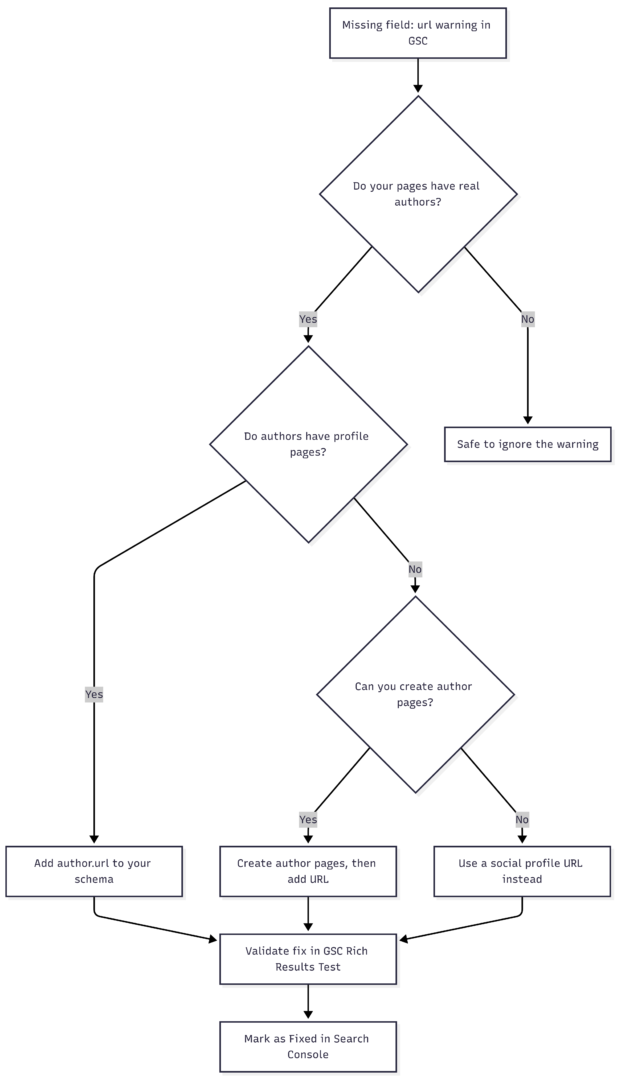
If your site has no real human authors — such as a one-person anonymous blog or auto-generated content pages — the warning is safe to ignore without any SEO penalty.
How to Fix It in WordPress
WordPress is the most common platform where this warning appears. The fix depends on which SEO plugin or theme you’re using.
Using Rank Math SEO
- Go to Rank Math → Titles & Meta → Authors
- Enable the Author Archive pages if they are disabled
- Each user should then fill in their profile URL under Users → Profile → Website
- Rank Math will automatically pull that URL into the
author.urlfield in the JSON-LD output
Using Yoast SEO
- Go to Users → Your Profile
- Fill in the Website field with the author’s profile URL
- In Yoast SEO → Search Appearance → Archives, ensure author archives are enabled
- Yoast will use the WordPress user profile website field to populate
author.url
Manually via functions.php or a Custom Plugin
If you manage your own JSON-LD output, locate where your Article schema is generated and add the author URL dynamically:
function custom_article_schema() {
    if ( is_single() ) {
        $author_id  = get_the_author_meta( 'ID' );
        $author_url = get_author_posts_url( $author_id );
        $schema = array(
            "@context"  => "https://schema.org",
            "@type"     => "Article",
            "headline"  => get_the_title(),
            "author"    => array(
                "@type" => "Person",
                "name"  => get_the_author(),
                "url"   => $author_url
            )
        );
        echo '<script type="application/ld+json">' . json_encode( $schema ) . '</script>';
    }
}
add_action( 'wp_head', 'custom_article_schema' );
The function get_author_posts_url() returns the WordPress author archive URL, which is a reliable, always-existing page — even if you haven’t built a custom author profile page.
Clearing Cache After Changes
After making any schema changes in WordPress, always clear your caching plugin (WP Rocket, W3 Total Cache, LiteSpeed Cache, etc.) and any CDN cache. Cached pages will serve old schema until the cache is purged, which means Google may continue seeing the old, incomplete markup.
Acceptable Author URL Sources
The URL you provide in author.url does not have to be an on-site author page. Google accepts several types of URLs for this field:
| URL Type | Example | Recommended? |
|---|---|---|
| Author archive page (WordPress) | https://yoursite.com/author/jane-doe/ | ✅ Best option |
| Custom author bio page | https://yoursite.com/about/jane-doe/ | ✅ Excellent |
| LinkedIn profile | https://linkedin.com/in/janedoe | ✅ Good for E-E-A-T |
| Twitter / X profile | https://twitter.com/janedoe | ✅ Acceptable |
| Wikipedia page | https://en.wikipedia.org/wiki/Jane_Doe | ✅ Strongest signal |
| Generic homepage (no author info) | https://yoursite.com | ⚠️ Technically valid, weak signal |
| Non-existent / broken URL | https://yoursite.com/author/ghost/ | ❌ Avoid — worse than no URL |
Always verify that any URL you add resolves to a live, indexable page before publishing. A 404 or redirected author URL can create new issues in Search Console.
Fixing It for Events Schema (organizer.url)
If the warning appears in your Events structured data, the missing field is organizer.url. The fix is straightforward:
{
  "@context": "https://schema.org",
  "@type": "Event",
  "name": "Annual Marketing Summit",
  "organizer": {
    "@type": "Organization",
    "name": "Marketing Pro Inc.",
    "url": "https://marketingpro.com"
  },
  "startDate": "2025-06-15T09:00",
  "location": {
    "@type": "Place",
    "name": "Conference Center",
    "address": "123 Main St, New York, NY"
  }
}
Ensure the url points to the organizer’s actual website or a specific event page. For recurring events with multiple organizers, each organizer object should contain its own URL.
Fixing It for Guided Recipes (Step Anchor Links)
For recipe schema, the “missing url” warning is different in nature. Google’s Guided Recipes feature (used for smart home devices and voice search) expects each instruction step to include an anchor link URL so users can jump directly to a specific step.
Example of a recipe step with the correct URL:
{
  "@type": "HowToStep",
  "name": "Mix the batter",
  "text": "Combine flour, eggs, and milk in a large bowl.",
  "url": "https://yoursite.com/recipe/chocolate-cake/#step-2"
}
Many recipe plugins — including Tasty Recipes and WP Recipe Maker — automatically generate these anchor link URLs. If you use one of these plugins, the warning will resolve on its own after Google re-crawls the page, and no manual action is needed.
Fixing It for phpBB Forums
For phpBB forums using the SEO Metadata extension by AlfredoRamos, the warning appears because the Discussion Forum schema generated for each post includes an author object without a url. The fix involves updating the extension’s helper.php to include the author’s profile URL dynamically.
The extension was officially updated in version 1.5.0 to include this field. If you are running an older version, update the extension through phpBB’s Customization Database. After updating, the JSON-LD output will automatically include the author’s forum profile URL, resolving the warning.
If you are running a custom or modified version, the relevant code change in helper.php should construct the author profile URL using the forum’s memberlist URL pattern:
'author' => [
    '@type' => 'Person',
    'name'  => $data['author_name'],
    'url'   => $board_url . '/memberlist.php?mode=viewprofile&u=' . $data['author_id']
]
Avoid using a static URL for all authors — this satisfies the validator but provides no real value to Google and could be considered misleading markup.
How to Validate the Fix
After making changes, always verify that the schema is correct before waiting for Google to re-crawl:
Step 1: Use the Rich Results Test
- Go to search.google.com/test/rich-results
- Enter the URL of the page you updated
- Review the structured data output and confirm
author.urlis now present - Confirm no new warnings or errors have appeared
Step 2: Validate in Google Search Console
- Log in to Search Console
- Navigate to Enhancements in the left sidebar
- Open the relevant report (Articles, Events, Discussion Forum, etc.)
- Click on the specific warning entry
- Select the affected URLs and click Validate Fix
- Google will re-crawl those URLs within a few days and update the status
Step 3: Confirm with Schema.org Validator
For a secondary check, paste your JSON-LD into the Schema.org Validator to confirm structural correctness independently of Google’s own tools.
Common Mistakes to Avoid
- Using a broken or non-existent URL: Always verify the author URL resolves before adding it to schema. A 404 author page is worse than no URL.
- Using the same generic URL for all authors: Mapping every author to your homepage URL defeats the purpose of entity disambiguation and adds no SEO value.
- Forgetting to clear cache: Schema changes won’t be visible to Google until cached pages are purged.
- Mixing schema types: The fix for
author.urlin Discussion Forum schema is different from Article schema. Applying Article schema fixes to forum pages can introduce new errors. - Manually editing plugin files without tracking changes: Plugin updates will overwrite manual changes to core plugin files. Always use hooks, child themes, or wait for official plugin updates.
Summary: Fix Methods by Platform
| Platform | Fix Method | Difficulty | Notes |
|---|---|---|---|
| WordPress + Yoast SEO | Add website URL to user profile; enable author archives | Easy | No code required |
| WordPress + Rank Math | Add website URL to user profile; enable author archives | Easy | No code required |
| WordPress (custom/manual) | Add author URL dynamically via functions.php or plugin | Medium | Requires PHP knowledge |
| phpBB | Update SEO Metadata extension to v1.5.0+ | Easy | Official fix available |
| Blogger / Custom HTML | Manually edit theme’s postMetadataJSON to include author URL | Medium | Requires theme access |
| Custom JSON-LD (any platform) | Add "url": "..." inside the author object directly | Easy | Straightforward code edit |
| Recipe plugins (Tasty, WP Recipe Maker) | Usually auto-handled; no action needed | None | Update plugin if warning persists |
Should You Prioritize This Warning?
The “Missing field: url” warning is classified by Google as a non-critical, optional enhancement. It will not cause your pages to be removed from search results, and it will not trigger a manual penalty. However, it is worth fixing for three reasons:
- Rich result eligibility: Fixing optional warnings can unlock additional rich result features that give your pages more visual prominence in search results.
- E-E-A-T signaling: Author URLs contribute to how Google evaluates the trustworthiness and expertise of content on your site, particularly for YMYL (Your Money or Your Life) topics.
- Technical hygiene: Keeping your Search Console warnings list clean makes it easier to spot and prioritize genuinely critical issues when they arise.
If your site has real authors with real profile pages, fix it. If it doesn’t, document the decision and move on to higher-priority SEO work.
Final Checklist
- ☐ Identify which schema type is triggering the warning (Article, Event, Discussion Forum, Recipe)
- ☐ Confirm the affected URLs in Search Console
- ☐ Add a valid, live
urlfield to the relevant schema object - ☐ If using WordPress, update the user profile website field and enable author archives
- ☐ Clear all caching layers (plugin cache, CDN cache)
- ☐ Validate using the Rich Results Test
- ☐ Submit for re-validation in Search Console
- ☐ Confirm the warning clears within 7–14 days
Please share this How to fix the Missing field: “url” warning with your friends and do a comment below about your feedback.
We will meet you on next article.
Until you can read, How to fix the Missing field: “name” warning