
Onsite Search Best Practices with Great Examples
When visitors land on your website, they usually have a clear goal in mind. If they cannot find what they need within seconds, they leave. Onsite search — also called internal or site search — solves this by letting users query your content, products, or features directly. A well-built onsite search reduces friction, keeps users engaged, and drives higher conversions across e-commerce stores, SaaS platforms, and content sites.
This comprehensive guide covers everything you need to know: how onsite search works, its key features and challenges, proven best practices with real examples, popular tools with current specifications and pricing, step-by-step implementation using Meilisearch, accessibility improvements, and e-commerce-specific strategies. Follow these practices to turn your site search into a high-performing growth engine.
What Is Onsite Search?
Onsite search is a built-in search engine on your website that helps users locate internal pages, products, blog posts, documentation, or other content without navigating menus. Think of typing “wireless game console” on Amazon and instantly seeing matching products instead of browsing categories. It powers discovery on every type of site and directly influences time on site, bounce rates, and revenue.
How Onsite Search Works: Step-by-Step Process
Onsite search looks simple from the front end but involves several backend steps for speed and relevance.
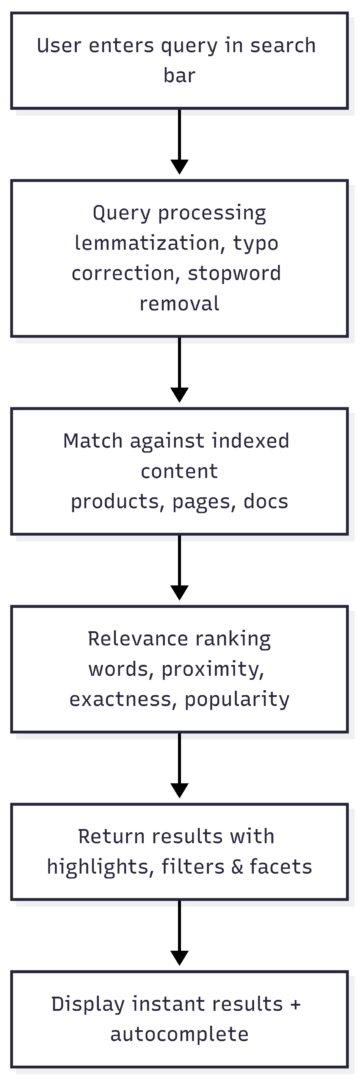
- Content Indexing: All relevant data — product descriptions, blog posts, FAQs — gets structured into a fast, searchable index with keywords, titles, categories, tags, and attributes.
- Query Input: The user types a term, phrase, or question.
- Query Processing: The engine cleans the input (removes punctuation, handles typos via fuzzy matching, applies stemming, and detects intent).
- Record Matching and Retrieval: The system compares the processed query against the index.
- Results Ranking and Display: Matches are ranked by relevance rules and shown with highlighted terms, filters, and facets for instant, usable results.
This process happens in milliseconds on modern engines.
Why Onsite Search Matters for Websites
A strong onsite search delivers measurable gains:
- Improved UX: Users skip endless menus and reach content instantly.
- Higher Conversion Rates: Search users convert 2–3× (sometimes up to 5–6×) more than non-search visitors. Optimized site search has driven 43% conversion lifts in case studies. Searchers often represent 14% of total revenue.
- Data Insights: Query logs reveal popular terms, gaps in inventory or content, and opportunities to add products or pages.
- Reduced Support Requests: Self-service answers cut repetitive tickets.
Poor search, however, frustrates users, increases bounce rates, and sends traffic to competitors.
Key Features of a Good Onsite Search
The difference between average and excellent search comes down to these features:
- Autocomplete Suggestions: As users type “hiking,” suggestions like “hiking shoes” or “hiking gear” appear instantly (Amazon excels here).
- Typo Tolerance and Fuzzy Matching: “Hking boots” still returns “hiking boots.”
- Search Filters and Faceted Navigation: Refine by brand, price, color, size, or category (Meilisearch’s faceted search is a prime example).
- Synonym Recognition: “Sofa” and “couch” return the same results.
- Instant High-Speed Results: Sub-100ms responses keep users focused.
- Highlighting: Searched terms are bolded in results for quick scanning.
- Mobile-Friendly Design: Touch-friendly filters and fast loading on any device.
- Personalization and Merchandising: Show relevant upsells or promoted items based on behavior.
Common Onsite Search Challenges and How to Fix Them
Even solid implementations face issues:
- Poor Relevance: Top results feel unrelated → fix with ranking rules and relevance tuning.
- Slow Performance: Delays over 1–2 seconds cause exits → use efficient indexing and caching.
- No Analytics: Missed insights → track queries, zero-results, and popular terms.
- No Typo Handling: Empty results for simple mistakes → enable fuzzy match and stemming.
Onsite Search Best Practices with Real Examples
Apply these proven tactics to avoid pitfalls and maximize results.
- Make the Search Bar Prominent
Place it at the top, clearly visible on every page. Use descriptive placeholder text like “Search products or articles.” Etsy’s large, always-visible bar drives usage. - Enable Smart Autocomplete
Show popular and trending suggestions in real time. Amazon’s autocomplete not only speeds up typing but guides users to high-margin items. - Highlight Search Terms in Results
Bold matches so users instantly see why a result appeared (Meilisearch does this cleanly). - Optimize for Mobile
Ensure filters are tappable, results load fast, and the experience matches desktop performance. Over 50% of traffic is mobile — slow search kills conversions here. - Build a Scalable, Clean Index
Index every relevant item (products, blogs, FAQs). Use sharding for growth. Structure content with clear titles, descriptive metadata, and consistent formatting. - Tune Relevance Aggressively
- Set searchable attributes in priority order (title > description > category).
- Define ranking rules: words, typo tolerance, proximity, exactness.
- Add filters for facets like price or brand.
- Build synonym sets (pants vs. trousers).
- Enable fuzzy matching and word stemming.
- Implement Searchandising
Curate results for specific queries: promote seasonal items, hide low-stock products, or boost high-margin ones. Control stop words and negative keywords. - Handle Zero Results Gracefully
Show “Did you mean…?” suggestions, popular items, or related categories instead of a blank page. - Add Voice Search and Advanced Features
Speech-to-text and generative answers (synthesizing info across documents) meet modern expectations. - Analyze and Iterate
Monitor top searches, zero-result queries, and filter usage. Use insights to update content, run marketing campaigns, or expand inventory.
Popular Onsite Search Tools: Comparison with Specs and Pricing
Choose the right engine based on scale, budget, and features.
| Tool | Type | Key Features | Pricing (starting) | Best For |
|---|---|---|---|---|
| Meilisearch | Open-source + Cloud | Instant results, typo tolerance, facets, autocomplete, ranking rules | Open-source: Free (self-hosted) Cloud Build: $30/mo (50K searches, 100K docs) Pro: $300/mo (250K searches, 1M docs) Enterprise: Custom | Developers, blogs, e-commerce needing speed & simplicity |
| Algolia | Hosted SaaS | AI-powered, synonyms, personalization, advanced analytics | Pay-as-you-go: $0.50 per 1K searches after 10K free; records $0.40 per 1K Higher tiers custom | Large e-commerce, high-volume sites |
| Elasticsearch | Open-source + Cloud | Full-text search, real-time indexing, complex queries, scalability | Self-managed: Free Elastic Cloud: ~$16–99/mo small instances; scales by CPU/RAM/storage (resource-based) | Enterprise, complex data needs |
| Site Search 360 | Hosted | Auto-crawl, autocomplete, filters, analytics | Free (150 entries, 1K searches) Columbo: $9/mo Holmes: $49/mo Higher custom | Small–medium sites, easy setup |
| AddSearch | Hosted | Fast indexing, synonyms, result management | Core: $119/mo (7.5K docs) Growth: $299/mo (25K docs) Advanced/Enterprise: Custom | Growing businesses wanting managed service |
All support core features like typo tolerance and filters. Test with your content volume and traffic.
How to Add Onsite Search: Step-by-Step with Meilisearch
Meilisearch offers a fast, developer-friendly way to implement powerful search.
- Run the Server (Docker recommended for simplicity):
docker run -d -p 7700:7700 getmeili/meilisearch:v1.6 - Install JavaScript SDK:
npm install meilisearch - Create an Index and Add Documents (example for a recipe site):
   const { MeiliSearch } = require('meilisearch');
   const client = new MeiliSearch({ host: 'http://localhost:7700' });
   const index = client.index('recipes');
   const documents = [ /* array of objects with id, title, content, category, tags, etc. */ ];
index.addDocuments(documents);- Configure Search Settings:
Update searchable attributes, ranking rules, and filterable fields for optimal relevance. - Build the Front-End Interface:
Simple HTML + JS example with real-time search and JSON output for testing.
Results appear instantly with highlights and facets. Scale to production with API keys and security.
Making Onsite Search Accessible
Inclusive search reaches every user:
- Add ARIA labels to the search bar and results.
- Support full keyboard navigation (arrows for suggestions, Enter to select).
- Ensure screen readers announce live updates and suggestions.
- Follow WCAG guidelines for contrast, semantic HTML, and alternative text.
These steps also improve SEO and overall UX.
Onsite Search in E-Commerce: Driving Sales and Loyalty
In online stores, search is a primary conversion channel. Shoppers using it convert far more often and spend more. Best practices include:
- Prominent search bar with autocomplete.
- Faceted filters (price, size, color, rating).
- Merchandising rules to promote bestsellers or upsells.
- Personalization based on past behavior.
- Zero-result pages with recommendations and “Did you mean?” fixes.
Strong e-commerce search reduces cart abandonment and increases average order value by surfacing related products naturally.
Advanced Optimization: Indexing, Relevance, and Analytics
Build a unified index covering products and pages. Configure exact/phrase matching with fallback to partial matches. Use synonyms, fuzzy tolerance, and stemming to cover natural language variations. Add a testing tool to preview ranking changes before going live.
Track everything: popular queries, no-results searches, filter usage. Turn insights into action — update content, launch campaigns, or stock demanded items. This loop continuously improves relevance and revenue.
Conclusion: Turn Onsite Search Into Your Competitive Edge
Onsite search is far more than a box on your page. When built with speed, relevance, smart features, and user-centric design, it becomes a discovery engine that delights visitors, cuts support costs, and multiplies conversions. Whether you self-host Meilisearch for control and low cost or choose a managed platform like Algolia for scale, the principles remain the same: index thoroughly, rank intelligently, analyze relentlessly, and iterate.
Implement these best practices today — make your search bar the most valuable real estate on your site. Visitors expect Google-level performance on your domain. Deliver it, and they will stay, buy, and return.
Please share this Onsite Search Best Practices with Great Examples with your friends and do a comment below about your feedback.
We will meet you on next article.
Until you can read, How to Find Pinterest Group Boards (And Actually Get Accepted)