Pinterest Story Pins — now officially called Idea Pins — are multi-page, interactive content posts that live permanently within Pinterest. Unlike traditional Pins that link out to a website, Idea Pins are designed to deliver value entirely inside the app. You can include up to 20 pages of video clips, images, text overlays, and voiceover narration, making them ideal for tutorials, recipes, step-by-step guides, DIY projects, and before-and-after transformations.
The most important thing to understand about Idea Pins right away is that they do not disappear. Story formats on Instagram and Snapchat vanish after 24 hours. Idea Pins are permanent, searchable, and saveable — which means a single well-made Idea Pin can continue surfacing in feeds and search results for months or years after you publish it. That permanence fundamentally changes their strategic value compared to ephemeral story formats on other platforms.
Pinterest positions Idea Pins as a creator-first publishing format. The goal is to give creators who build tutorials, instructional content, and inspiration-led material a way to publish rich, immersive content without needing a website or blog. For brands, they serve as a product-in-context showcase. For individual creators, they are an audience-building tool with unusually strong organic reach.
Idea Pins vs. Regular Pins vs. Instagram Stories: What’s Different
Understanding where Idea Pins sit relative to other formats helps you decide how to use them. The comparison below covers the three formats creators most commonly ask about:
| Feature | Pinterest Idea Pin | Regular Pinterest Pin | Instagram Story |
|---|---|---|---|
| Lifespan | Permanent | Permanent | 24 hours |
| Searchable | Yes | Yes | No |
| Outbound link | No (generally) | Yes | Yes (with link sticker) |
| Max pages / slides | Up to 20 | Single image or video | No hard limit (session-based) |
| Saveable to boards | Yes | Yes | No |
| Primary purpose | Teach / inspire (long-term) | Drive traffic to external site | Real-time updates / engagement |
| Feed prioritization | High (appears near top) | Standard distribution | Separate Stories bar |
| Aspect ratio | 9:16 vertical | 2:3 recommended | 9:16 vertical |
| Interactive elements | Tags, stickers, music, voiceover | Title, description, link | Polls, questions, links, music |
The critical trade-off with Idea Pins is the absence of an outbound link. Regular Pins are Pinterest’s primary traffic-driving format for bloggers and publishers. Idea Pins do not send users to your website. If your main goal is driving page views to an external site, regular Pins remain your primary tool. If your goal is building an engaged Pinterest audience, growing followers, and increasing your overall reach on the platform, Idea Pins are significantly more effective.
Why Idea Pins Get So Much Organic Reach
Pinterest has explicitly prioritized Idea Pins in its distribution algorithm since their launch. When you publish an Idea Pin, it is more likely to appear at the top of the home feed for relevant users than a standard image Pin. Pinterest surfaces Idea Pins in the home feed, in search results, in topic feeds, and in curated sections like the Today tab.
The engagement data reinforces this. Research across tens of millions of published Pins has found that Idea Pins — when created by the original creator rather than saved from someone else — generate substantially more saves than static image Pins. That save rate matters because each save extends distribution: when a user saves an Idea Pin to their board, Pinterest takes that as a quality signal and distributes the Pin further to users with similar interests.
Saved or re-shared Idea Pins, however, do not perform as well as originally published ones. Pinterest’s algorithm is specifically rewarding original creator content, not resharing. This means the distribution advantage of Idea Pins belongs to the creator who makes them, not to users who save and republish them from their own accounts.
Accounts with larger followings — particularly those above 10,000 followers — tend to see the strongest engagement lift from Idea Pins. But even newer accounts benefit from the format’s algorithmic prioritization, since Pinterest uses topic tags and interest matching to distribute Idea Pins beyond a creator’s existing follower base.
What Makes a Good Idea Pin: Format and Content Principles
The 20-page maximum is a ceiling, not a target. Most high-performing Idea Pins use between 5 and 12 pages. The format rewards concision and clarity. Each page should advance the story or tutorial — dead pages that repeat information or act as padding hurt watch-through rates, which Pinterest tracks as an engagement signal.
Content categories that consistently perform well in the Idea Pin format include step-by-step tutorials (cooking, crafts, DIY, beauty), recipe walkthroughs with ingredient lists on a dedicated detail page, before-and-after transformations, product-in-use demonstrations, educational listicles spread across multiple slides, and behind-the-scenes process content.
The format performs less well for content that is primarily text-heavy or that requires the user to visit an external resource to get the full value. If your content is naturally self-contained and instructional, Idea Pins are the right format. If the core value is in a detailed written article or product page, regular Pins with an outbound link will serve you better.
Technical Specifications for Idea Pins
| Specification | Detail |
|---|---|
| Maximum pages per Idea Pin | 20 |
| Recommended aspect ratio | 9:16 (vertical) |
| Recommended resolution | 1080 x 1920 px |
| Maximum video length per page | 60 seconds |
| Supported video formats | .mp4, .mov, .m4v |
| Supported image formats | .jpg, .png |
| Maximum file size (video) | 100 MB per clip |
| Title character limit | 100 characters |
| Maximum topic tags | 10 |
| Account type required | Pinterest Business Account (free) |
| Cost to create | Free |
Pinterest Business Accounts are free to create and provide access to Idea Pins, analytics, and creator profile tools. A personal account does not give access to the full Idea Pin creation suite or to performance analytics. If you are not yet on a business account, switching is free and takes under five minutes in account settings.
How to Create a Pinterest Idea Pin: Step by Step
The creation process is straightforward once you have a business account. Here is the full workflow from start to publish:
- Log into your Pinterest Business Account and click the Create button (top left on desktop, the plus icon on mobile).
- Select Create Idea Pin from the options that appear.
- Upload your media — between 1 and 20 images or video clips. Videos must be 60 seconds or shorter per page.
- Use the design tools to add text overlays, choose fonts and colours, adjust layouts, and reorder pages as needed.
- Add voiceover narration if applicable by recording directly in the app on mobile.
- Click Next to move to the detail settings page.
- Select a theme for your Idea Pin (this helps Pinterest categorise your content).
- Add any relevant detail content — ingredient lists for recipes, materials lists for DIY projects, etc. This appears on a dedicated information page within the Pin.
- Click Next again to reach the publishing settings.
- Write your Idea Pin title (up to 100 characters). Make it descriptive and keyword-relevant.
- Select the board you want to publish the Idea Pin to. Choose the most relevant board for the content.
- Add up to 10 topic tags. Use Pinterest’s autocomplete suggestions — these are drawn from actual user search behaviour and trending interest categories on the platform.
- Click Publish.
On mobile, the creation experience is more fluid — you can record video clips directly within the Pinterest app, which is useful for behind-the-scenes content or on-the-go tutorials. The desktop editor offers more precise control over text placement and layout, making it better suited for polished, pre-produced content.
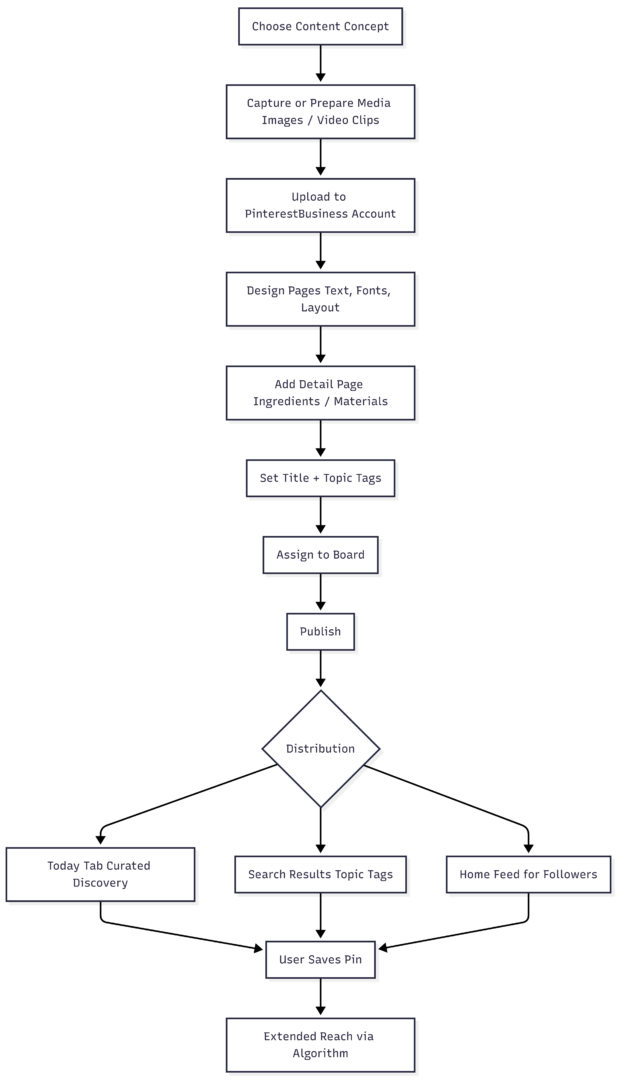
Idea Pin Creation Workflow
The following diagram shows how an Idea Pin moves from concept to distribution:
Early Seasoning vs. Late Seasoning: The Slow Cooker Parallel That Applies to Idea Pins
There is a useful analogy between how you layer flavour in a slow cooker recipe and how you build an Idea Pin content strategy. In slow cooking, you do not add everything at the start and hope it works out. Salt too early draws out moisture and sharpens bitterness. Delicate herbs added at the beginning of an eight-hour cook lose their volatile oils entirely. Dairy added at the start curdles. The best slow cooker dishes are built in deliberate layers — foundational aromatics early, structure-building ingredients through the middle, and finishing elements like fresh herbs, dairy, and bright acids added right at the end.
Idea Pins work the same way. The foundational layer — your core concept, your niche, your visual identity — needs to be established first and consistently. Topic tags and keyword-rich titles are your structural layer, telling Pinterest’s algorithm what your content is about so it can route it to the right audience. The finishing layer is engagement: responding to comments, reacting to saves, building community interactions that signal to the algorithm that your content is actively connecting with people.
Skipping the finishing layer — publishing and walking away — produces technically correct content that never fully develops its reach potential, just as a slow cooker dish seasoned only at the start ends up flat and one-dimensional by serving time.
Herbs vs. Spices Timing: Front-Loading Evergreen vs. Saving Topical Content
In cooking, spices (dried, robust, heat-stable) go in early to bloom and develop. Fresh herbs (delicate, volatile, aromatic) go in at the end to preserve their character. In Idea Pin strategy, the equivalent distinction is between evergreen content and topical content.
Evergreen Idea Pins — tutorials, how-to guides, recipe walkthroughs for staple dishes, foundational DIY skills — are your spices. They go in early and keep developing over time. A well-tagged, high-quality step-by-step tutorial for something people search for year-round (sourdough bread, a basic crochet stitch, a classic pasta sauce) will continue accumulating saves and impressions for years. This is the format’s greatest structural advantage: permanence rewards timeless content.
Topical or seasonal content is your fresh herbs. A holiday recipe round-up, a trend-driven tutorial, or a seasonal décor guide needs to be timed carefully and not built as the foundation of your Idea Pin strategy. It will spike and fade. The best approach is to build your content library predominantly on evergreen topics and supplement it with seasonal content during the periods when that content is genuinely relevant and searched for.
Flavor Layering in Your Idea Pin Content Strategy
A single Idea Pin is not a strategy. A content library built on layered, interconnected Idea Pins is. Flavor layering — the culinary principle that a dish’s complexity comes from building distinct but complementary elements that work together — translates directly into how you approach your Idea Pin publishing plan.
Consider a food creator whose niche is budget-friendly weeknight dinners. A well-layered Idea Pin strategy might look like this: foundational Idea Pins covering core technique (how to build a one-pot meal, how to use pantry staples effectively), mid-level Idea Pins applying those techniques to specific recipes, and finishing-layer Idea Pins that showcase variations, seasonal adaptations, or reader-submitted results. Each layer reinforces the others. A user who discovers the technique Idea Pin is primed to engage with the recipe Idea Pins. A user who saves a recipe Idea Pin is a natural candidate to engage with the variation Idea Pins.
This interconnected content architecture — each Idea Pin doing a specific job within a larger content ecosystem — is what separates accounts that plateau in engagement from accounts that compound their reach over time. It mirrors the way a skilled cook builds a dish: not just throwing ingredients together, but thinking about how each element enhances the others.
How Brands Are Using Idea Pins Effectively
The most effective brand uses of Idea Pins fall into three patterns. First, tutorial-led product integration: rather than showcasing a product directly, a brand demonstrates it in the context of a useful tutorial. A kitchenware brand showing a five-step technique for a specific cooking method, with their product used naturally throughout, generates far more genuine engagement than a promotional showcase. Second, behind-the-scenes storytelling: the process of making a product, the people behind a brand, or the sourcing of ingredients or materials. This builds trust and specificity that generic product images cannot replicate. Third, educational series: a coordinated set of Idea Pins that collectively teach something meaningful to a target audience, published consistently enough that the audience anticipates the next installment.
What does not work well: Idea Pins that are transparently promotional without providing value, repurposed static graphics that ignore the format’s interactive potential, and content that would clearly be better served as a regular Pin with an outbound link.
Analytics: What to Measure and What It Means
Pinterest Business Accounts include a dedicated analytics dashboard for Idea Pins. The key metrics to track and their strategic significance are as follows:
| Metric | What It Measures | What It Tells You |
|---|---|---|
| Impressions | Times the Idea Pin appeared on screen | Overall reach and distribution |
| Saves | Times a user saved the Pin to a board | Content value signal; drives further distribution |
| Close-ups | Times a user tapped to view detail | Visual interest and hook effectiveness |
| Reactions | Positive reactions (Love, Great idea, Wow, Thanks) | Emotional resonance of the content |
| Comments | Text responses from viewers | Depth of engagement; community signal |
| Follows from Pin | New followers attributed to a specific Idea Pin | Audience growth effectiveness |
| Watch time / completion rate | How far through the pages viewers swipe | Content quality and pacing effectiveness |
Saves are the single most important metric for organic reach. Pinterest’s algorithm interprets saves as a strong quality signal and responds by distributing the Idea Pin further. An Idea Pin with low impressions but a high save rate will eventually see its impressions grow. An Idea Pin with high impressions but low saves is being shown to the right volume of people but not compelling them — a signal to revisit the content quality, formatting, or topic relevance.
Common Mistakes to Avoid
The most frequent mistake new creators make with Idea Pins is treating them like a website traffic tool. They are not — at least not directly. If you publish Idea Pins and measure their success by the number of clicks to your external website, you will be disappointed. The metric that matters is audience growth and saves, which compound into broader platform reach that eventually supports your overall Pinterest presence, including your regular traffic-driving Pins.
The second common mistake is inconsistency. Idea Pins reward creators who publish regularly. One exceptional Idea Pin every three months will not build the algorithmic momentum that consistent publishing does. A realistic sustainable schedule — even one Idea Pin per week — is significantly more effective than sporadic bursts of content followed by long gaps.
The third mistake is neglecting topic tags. Up to 10 topic tags are available per Idea Pin. Using Pinterest’s autocomplete suggestions for tags aligns your content with actual user search behaviour and trending interest categories. Skipping tags or using generic ones reduces the platform’s ability to route your content to relevant users.
The Bottom Line
Pinterest Idea Pins are the platform’s most powerful organic reach format. They are permanent, searchable, saveable, and algorithmically prioritised. They will not replace regular Pins as a direct traffic driver, but they are the most effective tool Pinterest offers for building an engaged, growing audience on the platform itself.
A well-constructed Idea Pin strategy — built on evergreen content, layered across technique and application, published consistently, and measured by saves and follower growth rather than click-through — compounds in value over time in a way that few other content formats do. The key insight is the same one that separates a great slow cooker dish from a mediocre one: everything works better when you add the right elements at the right time, in the right order, with intention.
Please share this The Beginner’s Guide to Pinterest Story Pins with your friends and do a comment below about your feedback.
We will meet you on next article.
Until you can read, Google Updates AI Recipe Results To Send More Traffic