Three Ways to Repurpose Your Recipe Videos
Discover three effective ways to repurpose recipe videos for maximum reach: social media sharing, roundup videos, and recipe card integration.
Creating recipe videos is a labor-intensive process that involves planning, filming, editing, and promoting, not to mention the inevitable kitchen cleanup. For food bloggers, vloggers, or content creators, the effort invested in producing a single recipe video is substantial. Yet, the potential to extend the life of that content beyond its initial use is often overlooked. Repurposing recipe videos allows creators to maximize their reach, engage diverse audiences, and optimize their content’s value without duplicating the workload. This article explores three proven strategies to repurpose recipe videos effectively: re-cropping and sharing across social media platforms, creating roundup videos, and embedding videos in recipe cards. Each method is designed to amplify your content’s visibility, enhance audience engagement, and improve your site’s search engine optimization (SEO).
Why Repurpose Recipe Videos?
Before diving into the strategies, it’s worth understanding why repurposing is a game-changer for food content creators. Recipe videos are time-consuming and resource-intensive, often requiring hours of preparation and production. A single video can take anywhere from 2 to 10 hours to produce, depending on its complexity, according to food blogging communities. Repurposing allows you to leverage this effort across multiple channels, ensuring that your content reaches a broader audience while maintaining its relevance over time.
Moreover, repurposing aligns with modern content consumption trends. Audiences engage with food content differently across platforms—some prefer quick, visually appealing clips on TikTok, while others seek in-depth tutorials on YouTube. By tailoring your videos to suit various platforms and formats, you increase the likelihood of capturing attention and driving traffic back to your blog or website. Additionally, repurposing supports SEO by creating multiple touchpoints for your content, improving discoverability through search engines like Google.
The following sections detail three actionable ways to repurpose your recipe videos, complete with practical tips, examples, and tools to streamline the process.
1. Re-Crop and Share Across Social Media Platforms
Overview
Social media platforms are the backbone of modern content distribution, offering food creators unparalleled opportunities to reach diverse audiences. Platforms like Instagram, TikTok, Pinterest, Facebook, YouTube, and Twitter (now X) each support video content, but their formats, audience expectations, and optimal video dimensions differ. Repurposing a recipe video for social media involves re-cropping and editing it to fit each platform’s specifications, ensuring it resonates with the platform’s unique audience.
For instance, a horizontal recipe video created for a blog post can be re-cropped into a square format for Instagram’s feed or a vertical format for TikTok and Instagram Reels. This approach allows you to share the same video in multiple ways—such as in-feed posts, Stories, or Reels on Instagram—maximizing exposure. Data from social media analytics suggests that posting the same content in different formats across a single platform can increase engagement by up to 20%, as not all followers interact with every content type.
How to Repurpose for Social Media
- Understand Platform Specifications: Each social media platform has unique video requirements. Below is a table summarizing the recommended dimensions and durations for key platforms: Platform Recommended Aspect Ratio Maximum Duration Notes Instagram Feed 1:1 (square), 4:5 (vertical) 60 seconds Square or vertical formats perform best; include captions for accessibility Instagram Reels 9:16 (vertical) 90 seconds Fast-paced, engaging content with trending audio boosts visibility TikTok 9:16 (vertical) 3 minutes Use platform’s music library for better reach YouTube 16:9 (horizontal) No strict limit Longer, detailed videos work well; include timestamps for navigation Pinterest 9:16 or 1:1 15 minutes Focus on visually appealing pins with clear recipe outcomes Facebook 16:9 or 1:1 240 minutes Shorter videos (1-3 minutes) tend to perform better X (Twitter) 16:9 or 1:1 2 minutes 20 seconds Concise, engaging clips with hashtags for discoverability
- Re-Crop Strategically: Use video editing software like Adobe Premiere Pro, Final Cut Pro, or free tools like DaVinci Resolve to re-crop your video. When shooting, compose frames with flexibility in mind, ensuring key elements (e.g., ingredients, cooking actions) remain visible in various aspect ratios. For example, avoid placing critical text or visuals near the edges, as they may be cropped out in vertical formats.
- Tailor Edits to Platform Needs: Different platforms favor different video styles. Instagram Reels and TikTok thrive on short, snappy videos (15-30 seconds) that showcase the final dish prominently, often with a “hook” like a bite shot to grab attention. YouTube, conversely, supports longer, instructional content. Use the same footage but rearrange clips, adjust pacing, or add platform-specific elements like end cards. For instance, Pinch of Yum’s blog video for a recipe might be horizontal and detailed, while its Instagram version is cropped to a square and ends with a branded call-to-action.
- Incorporate Platform-Specific Audio: Audio plays a significant role in engagement. TikTok and Instagram Reels allow access to trending music libraries, which can boost discoverability. YouTube and Facebook, however, may flag copyrighted music, so opt for royalty-free tracks from services like Epidemic Sound or YouTube’s Audio Library.
- Test and Analyze Performance: Experiment with different edits and track performance using platform analytics. For example, Instagram Insights can reveal whether a Reel outperforms a feed post, guiding future repurposing efforts.
Example
Pinch of Yum demonstrates this strategy effectively. Their blog post video for a recipe like “Creamy Garlic Pasta” is horizontal, fitting the website’s layout. The same video, re-cropped to a square format, appears on their Instagram feed with a modified end card linking back to the blog. This approach ensures the video feels native to each platform while driving traffic to the original recipe.
Tools for Re-Cropping and Editing
- Adobe Premiere Pro: Industry-standard software for precise cropping and editing ($20.99/month).
- DaVinci Resolve: Free, professional-grade editing with robust cropping tools.
- Canva Pro: User-friendly for quick edits and social media templates ($12.99/month).
- InShot: Mobile app for fast cropping and editing ($3.99/month or free with limitations).
Benefits
Re-cropping for social media extends your video’s reach, engages platform-specific audiences, and reinforces brand consistency. It’s a low-effort way to repurpose content, requiring only minor adjustments to existing footage.
2. Create Roundup Videos
Overview
Roundup videos compile clips from multiple recipe videos into a single, cohesive video, showcasing a collection of related recipes. This format is ideal for highlighting seasonal dishes, meal types, or popular recipes, such as “5 Easy Weeknight Dinners” or “10 Holiday Cookie Recipes.” Roundup videos can be shared on social media platforms like YouTube, Instagram, or TikTok, or embedded in blog posts to drive traffic.
The appeal of roundup videos lies in their ability to expose audiences to multiple recipes in one engaging package. For example, Tasty’s YouTube video featuring 31 cookie recipes has garnered over 9 million views, proving the format’s popularity, especially during high-traffic periods like the holidays.
How to Create Roundup Videos
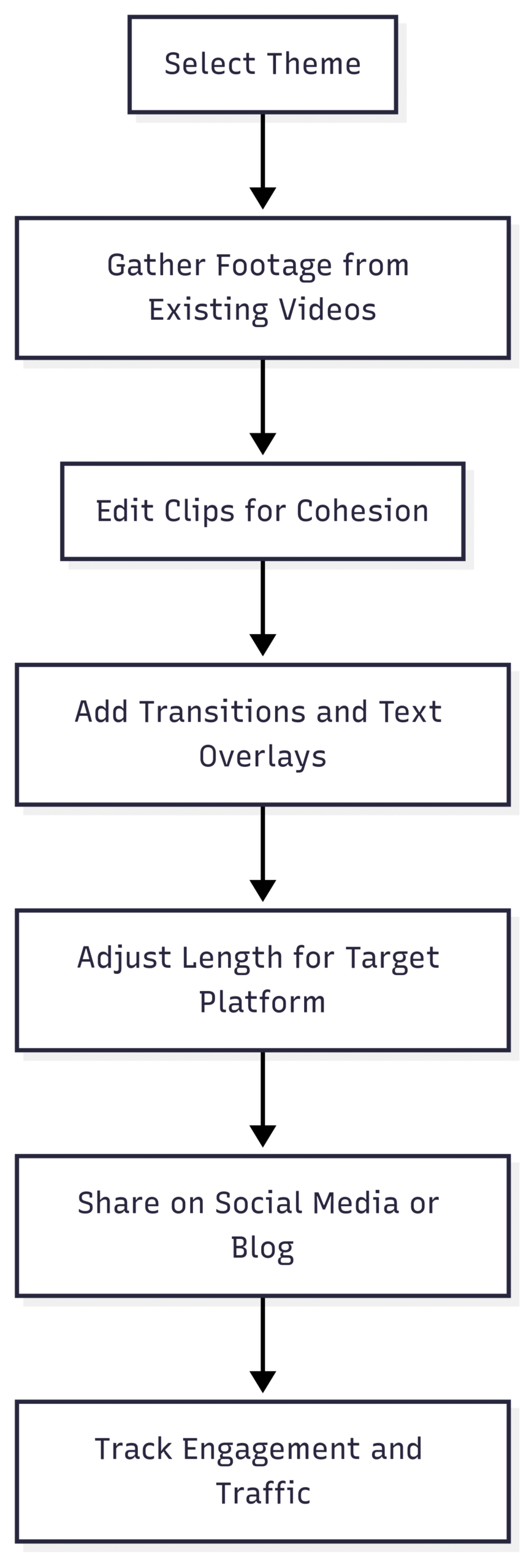
- Select a Theme: Choose a unifying theme, such as cuisine type (e.g., Italian), dietary preferences (e.g., vegan), or occasions (e.g., holiday desserts). This ensures the video feels cohesive and appeals to a specific audience segment.
- Compile Clips: Gather footage from existing recipe videos. Focus on visually appealing clips that highlight key steps or the final dish. Aim for 3-10 recipes, depending on the platform and video length.
- Edit for Flow: Use editing software to stitch clips together seamlessly. Add transitions, text overlays, and a consistent visual style to maintain viewer interest. For YouTube, a longer video (5-15 minutes) works well, while Instagram and TikTok favor shorter formats (30-90 seconds).
- Optimize for Platforms: Tailor the video’s length and style to the target platform. For example:
- YouTube: Create a detailed, narrated video with timestamps for each recipe.
- Instagram/TikTok: Produce a fast-paced montage with vibrant visuals and trending audio.
- Blog Post: Embed a medium-length roundup video (2-5 minutes) with links to individual recipes.
- Promote Across Channels: Share the roundup video on social media and embed it in a blog post with links to full recipes, driving traffic to your website.
Example
Tasty’s “31 Cookie Recipes” YouTube video is a masterclass in roundup content. The 45-minute video compiles short clips of each recipe, with clear visuals and minimal narration, making it easy for viewers to browse and select recipes to explore further. A shorter version could be adapted for TikTok, focusing on the top 5 cookies with quick transitions.
Tools for Roundup Videos
- Final Cut Pro: Advanced editing for polished roundup videos ($299.99 one-time purchase).
- iMovie: Free for Mac users, suitable for simple edits.
- CapCut: Free mobile app with templates for quick roundup creation.
- Adobe Express: Web-based tool for fast video editing ($9.99/month).
Benefits
Roundup videos increase engagement by showcasing multiple recipes, cater to viewers’ desire for variety, and drive traffic to individual recipe posts. They also position your brand as a go-to resource for curated content.
Process Flow for Creating Roundup Videos
Below is a flowchart illustrating the process of creating a roundup video:
3. Embed Videos in Recipe Cards
Overview
Embedding videos directly into recipe cards on your blog enhances user experience and boosts SEO. Recipe cards, which list ingredients and instructions, are a critical component of food blogs, and adding videos makes them more interactive and informative. There are two ways to incorporate videos into recipe cards:
- Full Video Embedding: Include the entire recipe video within the recipe card, providing a comprehensive visual guide.
- Step-by-Step Videos: Break the video into short clips corresponding to each recipe step, helping users follow along precisely.
Embedding videos aligns with recipe schema requirements, which search engines like Google use to index recipes and display them in rich results, such as Google’s recipe carousel. According to schema.org, including a video in your recipe schema can improve click-through rates by up to 15%.
How to Embed Videos in Recipe Cards
- Full Video Embedding:
- Choose a Plugin: Use a recipe plugin like Tasty Recipes, WP Recipe Maker, or Create by Mediavine that supports video embedding. These plugins allow you to add a video URL or upload a video directly to the recipe card.
- Optimize for SEO: Ensure the video is hosted on a platform like YouTube or Vimeo and linked correctly in the recipe schema. Include metadata like video title, description, and thumbnail.
- Example: Pinch of Yum embeds full recipe videos in their Tasty Recipes plugin, placing the video above the ingredients list for easy access.
- Step-by-Step Videos:
- Edit Clips: Use editing software to cut your recipe video into short segments (10-30 seconds) for each step, such as “mixing the batter” or “browning the meat.”
- Integrate with Plugin: Plugins like Tasty Recipes allow you to embed individual video clips for each step. Contact your plugin’s support team to confirm compatibility.
- Focus on Clarity: Shoot videos at real-time speed to make steps easy to follow. Highlight critical techniques, such as the texture of caramelized onions or the consistency of dough.
- Example: Pinch of Yum’s recipe card for “Spicy Peanut Soba Noodles” includes step-by-step videos showing key techniques, enhancing user understanding.
- Plan During Filming: Before shooting, identify key steps or techniques to capture in detail. For example, film close-ups of folding dough or searing meat to ensure usable footage for step-by-step clips.
Tools for Recipe Card Videos
- Tasty Recipes: WordPress plugin with robust video embedding features ($49/year).
- WP Recipe Maker: Flexible plugin for recipe cards with video support ($49/year).
- Vimeo: Reliable video hosting with analytics ($12/month for Plus plan).
- HandBrake: Free tool for compressing videos to reduce load times.
Benefits
Embedding videos in recipe cards improves user engagement, reduces bounce rates, and enhances SEO through schema markup. Step-by-step videos, in particular, cater to visual learners, making recipes more accessible.
Addressing Common Pain Points
A common frustration among viewers, as highlighted in online discussions, is the lack of recipe details in videos. Comments on platforms like Reddit reveal that users are annoyed when food videos omit measurements or ingredients, forcing them to visit external websites. To address this:
- Include Text Overlays: Add ingredient lists and measurements as text overlays in social media videos to provide immediate value.
- Link to Full Recipes: Use clear calls-to-action (e.g., “Full recipe at [website]”) to drive traffic without frustrating viewers.
- Leverage Tools like YouTubeRecipe.com: This platform transcribes YouTube cooking videos into recipes, addressing user pain points. While useful for viewers, creators should ensure their own websites provide easily accessible recipes to retain traffic.
Ethical Considerations
When repurposing content, especially for roundup videos or external platforms, respect original creators’ work. If featuring others’ recipes in a roundup, obtain permission or link directly to their content to avoid diverting traffic unethically. As noted in online discussions, aggregating recipes without proper attribution can harm creators’ ad revenue and engagement.
Measuring Success
To evaluate the effectiveness of your repurposing efforts, track key performance indicators (KPIs):
- Engagement Metrics: Monitor likes, shares, comments, and view counts on social media platforms.
- Traffic Data: Use Google Analytics to track referral traffic from social media and roundup videos to your blog.
- SEO Performance: Check Google Search Console for improvements in recipe schema rankings and click-through rates.
- Conversion Rates: Measure whether repurposed content leads to newsletter sign-ups, ad clicks, or affiliate link purchases.
Sample KPI Dashboard
| Metric | Platform | Target | Tool |
|---|---|---|---|
| Video Views | Instagram, TikTok | 1,000+ per post | Platform Analytics |
| Website Traffic | Blog | 10% increase monthly | Google Analytics |
| Recipe Schema Impressions | Google Search | 500+ per recipe | Google Search Console |
| Engagement Rate | YouTube, Facebook | 5%+ (likes/views) | Platform Analytics |
Conclusion
Repurposing recipe videos is a strategic way to maximize the value of your content, reach new audiences, and enhance your blog’s SEO. By re-cropping videos for social media, creating engaging roundup videos, and embedding videos in recipe cards, you can extend the lifespan of your content with minimal additional effort. Each method caters to different audience preferences and platform dynamics, ensuring your recipes remain discoverable and engaging. Start by experimenting with one strategy, track its performance, and refine your approach to build a sustainable content strategy that keeps your audience hungry for more.
Please share these Three Ways to Repurpose Your Recipe Videos with your friends and do a comment below about your feedback.
We will meet you on next article.
Until you can read, The Importance of Measuring Ingredients by Weight for Your Recipes