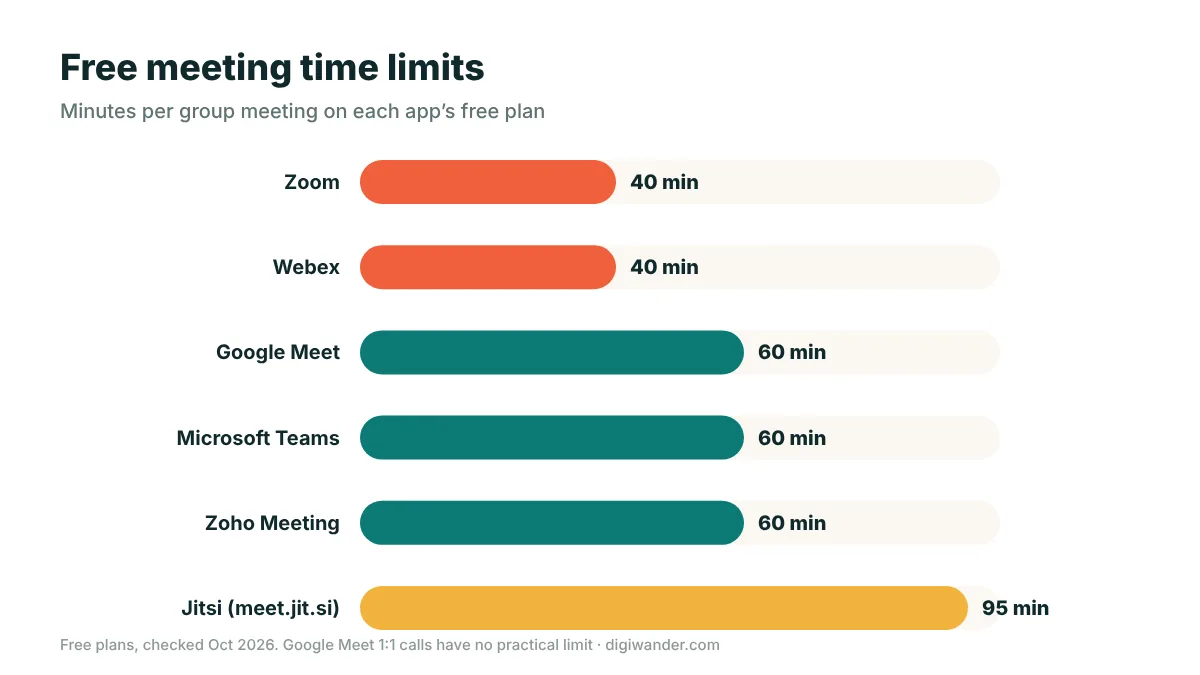
We compared the seven most popular video conferencing apps on their free plans, pricing, features and how they cope with weak connections. Zoom is still the best all-round video conferencing app, Google Meet is the easiest free option, and Microsoft Teams is the best choice if your company already uses Microsoft 365. For long free calls, Google Meet and Teams (60 minutes) beat Zoom and Webex (40 minutes). Here is how all seven compare in 2026.
In this guide
Quick picks
- Best overall: Zoom — reliable, familiar to clients, strong on weak connections.
- Best free app: Google Meet — runs in the browser, 60-minute group calls, unlimited 1:1 calls.
- Best for companies on Microsoft 365: Microsoft Teams.
- Best for enterprise security: Webex.
- Best budget paid plan: Zoho Meeting.
- Best no-download meeting rooms: Whereby.
- Best open-source option: Jitsi Meet.
Free plan comparison
| App | Free meeting limit | Free participants | Paid plans from | Browser join |
|---|---|---|---|---|
| Zoom | 40 minutes | 100 | Pro ~$14.16/user/month | Yes |
| Google Meet | 60 min (groups), 1:1 unlimited | 100 | Included in Google Workspace | Yes (no install) |
| Microsoft Teams | 60 minutes | 100 | Teams Essentials $4/user/month | Yes |
| Webex | 40 minutes | 100 | Webex Meet $12/month | Yes |
| Zoho Meeting | 60 minutes | 100 | Low-cost paid tiers | Yes |
| Whereby | Limited free room | Small groups | Pro ~$8.99/user/month | Yes (no install) |
| Jitsi Meet | 95 min on meet.jit.si | Varies | Free / self-host | Yes (sign-in to start) |
Limits and prices from each provider and independent reviews, checked October 2026. Prices on annual billing where stated.
How we compared them
We looked at what matters to remote workers and digital nomads specifically: the limits of each free plan, the price of the first paid tier, whether guests can join from a browser without installing anything, how each app handles unstable connections, and extra features like recording, transcripts and breakout rooms. Pricing and limits come from each provider’s own pages and recent independent reviews.
The 7 best video conferencing apps in 2026
1. Zoom — best overall
Best overallZoom is still the app most clients expect. The free plan hosts up to 100 participants for 40 minutes per meeting; Pro (about $14.16 per license per month) removes the short limit and adds cloud recording. Its biggest strength for travellers is how gracefully it handles poor connections — you can drop video and stay on audio without leaving the call.
Pros
- Familiar to almost everyone
- Good on weak Wi-Fi
- Huge app and integration library
Cons
- 40-minute free limit
- Business plan needs multiple licenses
2. Google Meet — best free option
Best freeAnyone with a Google account can host a Meet call: one-to-one calls have no practical time limit, and group calls run up to 60 minutes with up to 100 people. Guests join straight from Chrome or any modern browser, which is perfect when a client cannot install software on a work laptop. Paid Google Workspace plans add longer meetings, recording and more participants.
3. Microsoft Teams — best for Microsoft 365 users
Best for companiesThe free version of Teams allows 60-minute calls with up to 100 participants and includes 5 GB of cloud storage. Paid plans start at $4 per user per month (Teams Essentials) and $7 for Microsoft 365 Business Basic on annual billing. If your employer already lives in Outlook and SharePoint, Teams is the path of least resistance.
4. Webex — best for enterprise security
Best for securityCisco’s Webex offers a free plan with unlimited 40-minute meetings for up to 100 attendees. Webex Meet costs $12 per month ($144 a year) and extends meetings to 24 hours with up to 200 attendees. It is popular with large and regulated organizations, so you may need it for corporate clients.
5. Zoho Meeting — best budget paid plan
Best valueZoho Meeting’s free plan covers 60-minute meetings with up to 100 participants, and its paid tiers are among the cheapest on this list. It pairs well with Zoho’s CRM and invoicing tools, which many freelancers already use.
6. Whereby — best no-download meeting rooms
Easiest for guestsWhereby gives you a permanent meeting-room link that guests open in their browser — no app, no account. The free plan is limited (a single room for small groups), so it suits quick client check-ins; the Pro plan is around $8.99 per user per month.
7. Jitsi Meet — best open-source option
Open sourceJitsi Meet is free and open source. On the public meet.jit.si service you sign in to start a meeting, and meetings there are now limited to 95 minutes. Technical teams can host Jitsi on their own server to remove those limits and keep full control of their data.
Tips for video calls while travelling
- Test your connection first. As a rule of thumb, 10–25 Mbps down and 3–5 Mbps up is comfortable for HD calls. More detail in is 300 Mbps good for working from home?
- Have a backup. Keep an eSIM or local SIM with data so you can hotspot if the café Wi-Fi drops.
- Use headphones with a mic. They cut echo and background noise far more than any software setting.
- Check time zones twice. Send invites with the time zone written out, and let the calendar convert it.
- Mind cultural differences. Directness, small talk and punctuality vary a lot — see our strategies for effective cross-cultural communication. Want more screen space? Try virtual reality for working from home.
- Switch to audio-only when the connection is weak — every app on this list supports it.
Which app should you choose?
If you only need a tool for yourself, use Google Meet for free calls and upgrade to Zoom Pro if you host long client calls every week. If your company chooses for you, it will almost always be Teams or Zoom — learn both. Choosing for a whole team? See the best video conferencing app for every team type.
Working remotely while you travel also means sorting out your money: see the best banks for digital nomads and how to get paid by foreign clients.
Frequently asked questions
What is the best video conferencing app?
Zoom is the best all-round app for most people thanks to its reliability and familiarity. Google Meet is the best free option, and Microsoft Teams is best if your organization already uses Microsoft 365.
Which video conferencing app is free with no time limit?
Google Meet one-to-one calls have no practical time limit on a free account. Group calls on free plans are limited: 60 minutes on Google Meet and Microsoft Teams, and 40 minutes on Zoom and Webex.
How long can a free Zoom meeting last?
Free Zoom meetings are limited to 40 minutes, with up to 100 participants. Zoom Pro removes the short time limit.
What internet speed do I need for video calls?
As a rule of thumb, around 10–25 Mbps download and 3–5 Mbps upload is comfortable for HD video calls. If your connection is weak, turn off video and stay on audio.
Is Google Meet or Zoom better?
Google Meet is better for quick free calls that guests join in a browser. Zoom is better for long, frequent client meetings, large webinars and weak connections.
Sources
- Webex — Plans and pricing
- TechRadar — Best free video conferencing
- Pumble — Microsoft Teams vs Zoom (2026 pricing)
Last updated . Fees, rules and prices change often — confirm current details with the official source before you act. This article is for information only and is not financial advice. See our disclaimer.